
Make.com Duplicate Prevention: Stop Duplicate Records on Retry
Make.com duplicate prevention stops duplicate records when webhook retries, reruns, or manual replays fire twice. Learn Data Store gates and safe replay.
If Make.com can still write twice after a timeout
Data Store gates, replay state, and owner-routed alerts are the control surface this guide unpacks. For how new projects are scoped, use services; for a direct conversation, contact.
On this page (17)
- How to stop duplicate records when Make.com retries, reruns, or replays
- Why Make.com creates duplicates (at-least-once delivery explained)
- Does Make.com have built-in deduplication?
- How to use Data Store for deduplication (Make.com Data Store dedupe pattern)
- Idempotency key pattern for webhook triggers
- How to prevent duplicate runs when webhook fires twice
- How to stop duplicate records when scenario reruns
- Make.com search then create pattern for HubSpot writes
- Step-by-step: complete dedupe setup in Make.com
- Validation tests before production
- Monitoring that keeps duplicate risk low
- Permanent prevention model (not one-off cleanup)
- Edge cases that still create duplicates if you ignore them
- How to recover when duplicates already exist
- Team implementation checklist (first 2 weeks)
- FAQ
- Next steps
On this page
How to stop duplicate records when Make.com retries, reruns, or replays
Teams do not come looking for "duplicate prevention" in the abstract. They come after a webhook fires twice, a rerun creates another contact, or a timeout duplicates a finance write.
I have used this exact model in production audits because duplicate cleanup is always slower than putting a deterministic gate in front of the next write.
I see this in production audits of Make.com webhook lanes: the visible run status looks green while the business state underneath is already wrong. That is exactly why Make.com duplicate prevention needs a production model, not a checkbox in one module.
Most duplicate incidents come from three patterns happening together:
- at-least-once webhook delivery from source platforms,
- retries after downstream timeouts,
- manual reruns without event-level state.
If you are reading this during a live incident, you are not alone. The failure mode is common, and the fix is repeatable. This guide gives the complete model I use in production rollouts: dedupe key design, Data Store gate, search-then-create write logic, error ownership, and monitoring.
If you searched for "Make.com duplicate records", "webhook fired twice", or "scenario rerun created another contact", the root issue is usually the same: no deterministic gate exists between repeated delivery and the next write.
If retries, reruns, or replay ambiguity are the core problem, start with Make.com error handling. If those duplicate writes already polluted HubSpot owners, lifecycle history, or CRM trust, route the damaged lane into HubSpot workflow automation or CRM data cleanup. For operating context, see About. For a concrete example of duplicate removal in a HubSpot lane, review Typeform to HubSpot dedupe.
Why Make.com creates duplicates (at-least-once delivery explained)
Webhook systems deliver events with at-least-once semantics. That means the same event can be delivered more than once, especially when acknowledgments are delayed or network responses are ambiguous.
A typical duplicate chain:
- Source sends webhook event
evt_18492. - Make.com starts execution and reaches external write.
- Destination API succeeds slowly.
- Source does not see fast acknowledgment and resends.
- Make.com receives same business event again.
- If no deterministic dedupe gate exists, second write creates duplicate record.
From platform perspective, each attempt is valid. From business perspective, the second write is data corruption.
This is why "scenario success rate" is not enough. You need event-level correctness checks.
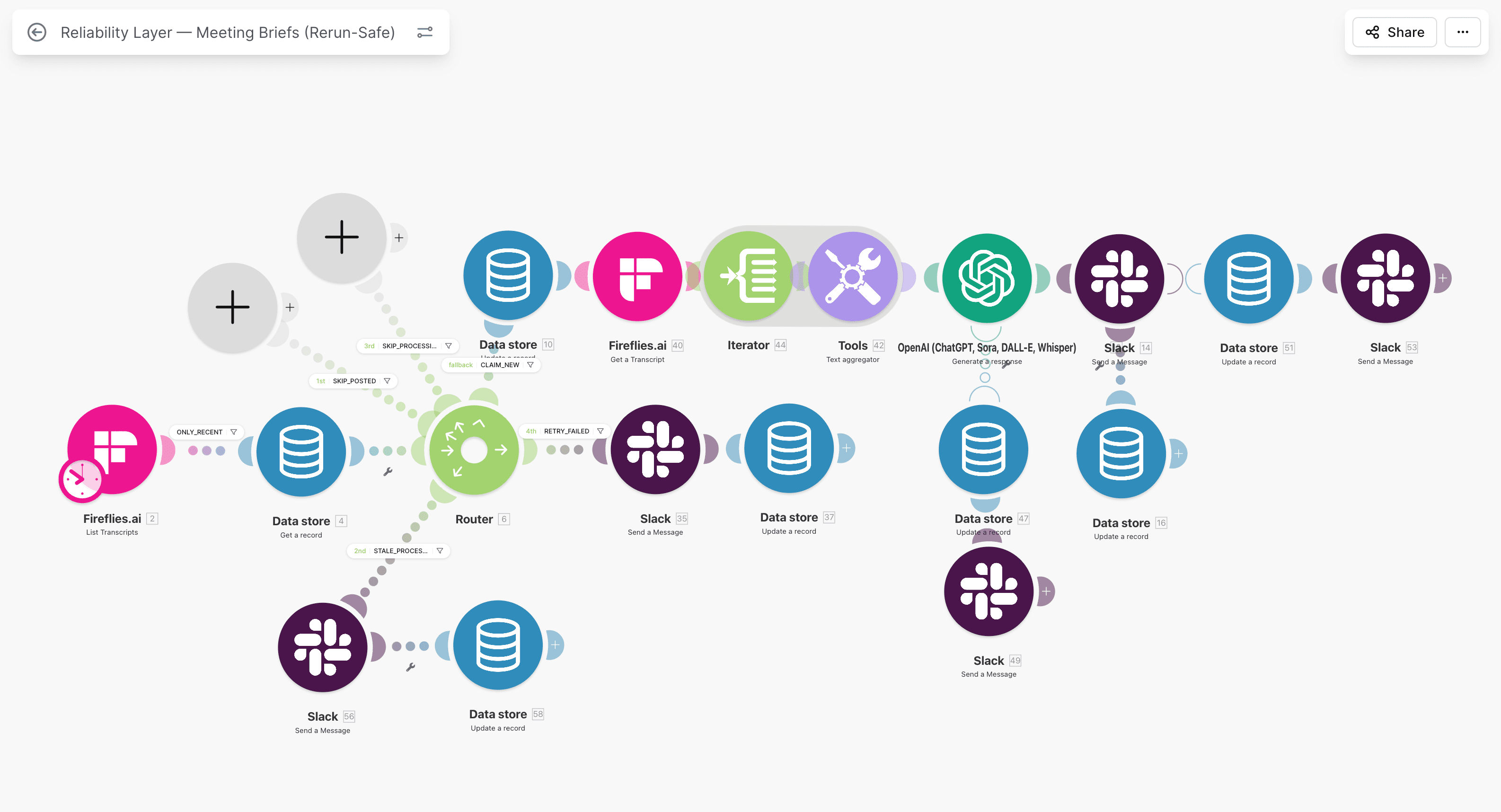
Without event-level gating, retries and resends can both produce valid-looking but duplicate writes.
Does Make.com have built-in deduplication?
Short answer: not in the way production teams need it.
Make.com can filter, route, and retry, but it does not provide a complete business-event dedupe model out of the box. You still need to define:
- stable idempotency key from source data,
- state memory for each event,
- explicit behavior when key reappears,
- replay policy with ownership.
Teams often assume that using one filter or one search module equals dedupe. It does not. Dedupe is a full control path, not a single condition.
A reliable model needs to survive:
- source resend,
- timeout retry,
- branch replay,
- manual rerun by operator.
If any of those create a second write, your dedupe is incomplete.
How to use Data Store for deduplication (Make.com Data Store dedupe pattern)
Data Store is the most practical ledger for Make.com duplicate prevention because it keeps control state inside the same runtime.
Minimum record fields:
| Field | Role in dedupe |
|---|---|
processing_id | unique key for business event |
status | new, processing, completed, failed, dead_letter |
source | source app and event type |
created_at | first seen timestamp |
updated_at | last transition timestamp |
error_code | failure class for operator triage |
Lookup policy before writes:
completed-> skip and log duplicate prevented,processing-> block concurrent re-entry,failed-> route to controlled retry,- missing -> create row and continue.
This one gate is where most duplicate incidents are prevented.
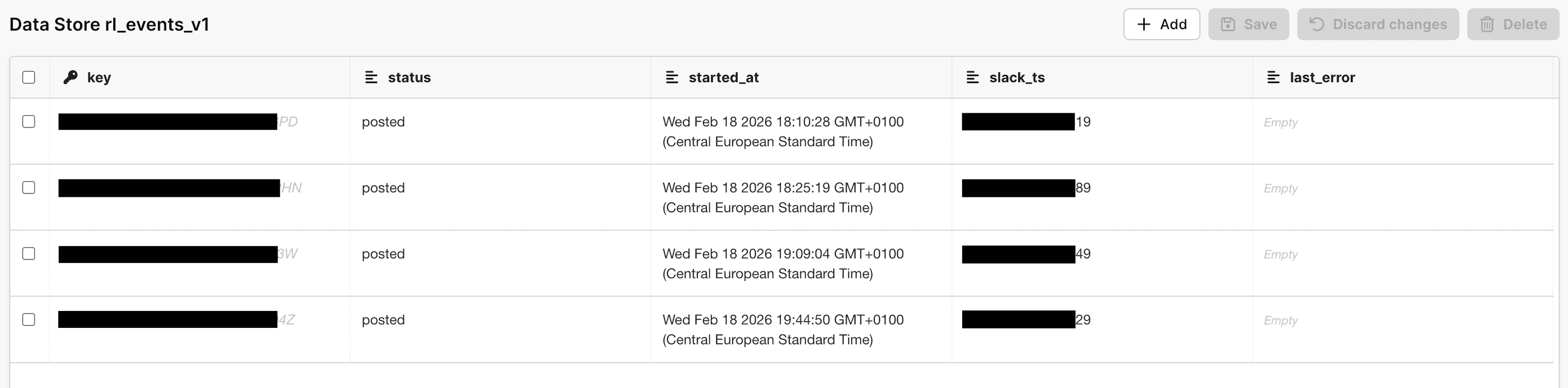
Data Store acts as a deterministic gate, not just passive logging.
Idempotency key pattern for webhook triggers
The key rule is simple: key comes from source intent, never from execution attempt.
Good key sources:
- webhook event ID,
- form submission token,
- invoice number plus source namespace,
- deterministic payload hash from stable fields.
Bad key sources:
- Make execution ID,
- current timestamp,
- random UUID generated per run.
If key changes on retry, dedupe fails by design.
Practical key recipe I use:
- normalize source fields,
- build one deterministic
processing_id, - store it before first side effect,
- reuse same key across retries and replays.
This model also aligns with Make.com Data Store as a state machine, where the same key anchors every status transition.
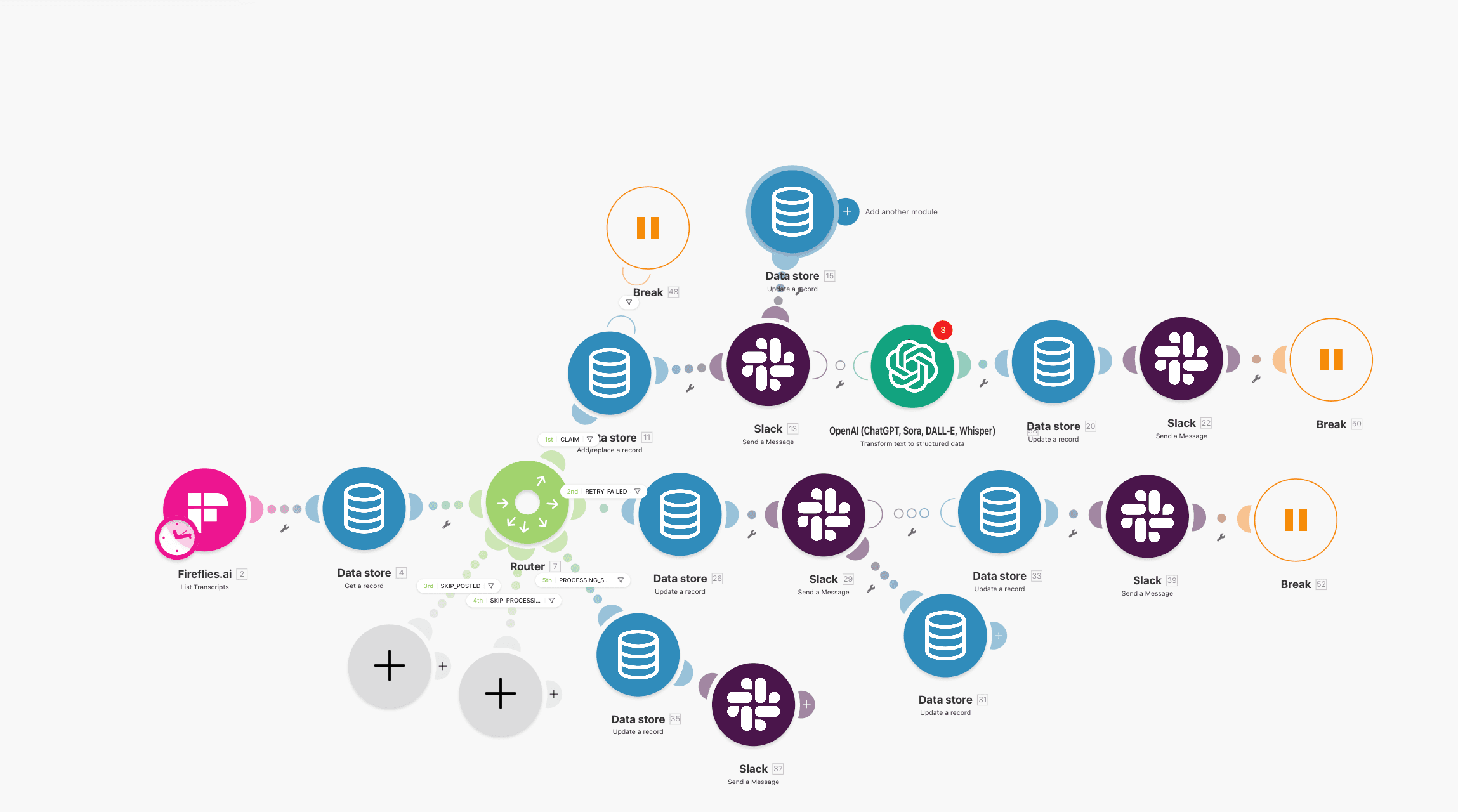
If the key is unstable, no downstream dedupe logic can save you.
How to prevent duplicate runs when webhook fires twice
When the same webhook arrives twice, your scenario must prove this is replay, not new intent.
Use this flow:
- webhook received,
- compute
processing_id, - lookup in Data Store,
- if
completed, stop write path and log duplicate prevented, - if missing, continue normal processing.
Add a short lock window for processing state so concurrent arrivals of the same event do not race into duplicate writes.
Common mistake: teams place dedupe check only once at scenario start, then run multiple downstream write branches without additional guards. Each critical write branch still needs protection.
How to stop duplicate records when scenario reruns
Scenario reruns happen during incident recovery, module retries, or manual operations.
To keep reruns safe:
- separate ingestion from replay lane,
- permit replay only for
failedrecords, - reuse same
processing_id, - transition status explicitly,
- block
completed -> processingunless manual override is approved.
This is where many lanes break. Operators rerun entire scenarios to recover one failed module and accidentally re-create records that already succeeded.
Use a replay runbook with strict entry criteria:
- one failed event id,
- expected missing side effect,
- owner assigned,
- post-replay verification.
If you need a deeper incident process, pair this with Make.com webhook debugging playbook and Make.com retry logic without duplicates.
Implementation path
Retries, reruns, or replays already creating duplicate records?
Harden retries and reruns at the branch where they originate. The article is the deep dive; services explains current engagement options.
Make.com search then create pattern for HubSpot writes
Search-then-create is mandatory for contact writes.
Pattern:
- search HubSpot by normalized email and external key,
- if found, update allowed fields only,
- if not found, create contact,
- write result status to Data Store.
This avoids blind create behavior during retries and reduces duplicate contacts dramatically.
You can see this implemented in HubSpot + Typeform reliability setup and validated in HubSpot workflow audit: 7 silent failures.
For service scope in this lane, see Make.com error handling.
Step-by-step: complete dedupe setup in Make.com
Step 1: Define one dedupe contract
Document:
- primary key structure,
- state model,
- allowed transitions,
- replay ownership,
- retention policy.
No contract means every future scenario can reintroduce duplicate risk.
Step 2: Add dedupe router before first write
Configure router outputs by state:
completed-> skip,processing-> lock safe exit,failed-> retry queue,- missing -> continue.
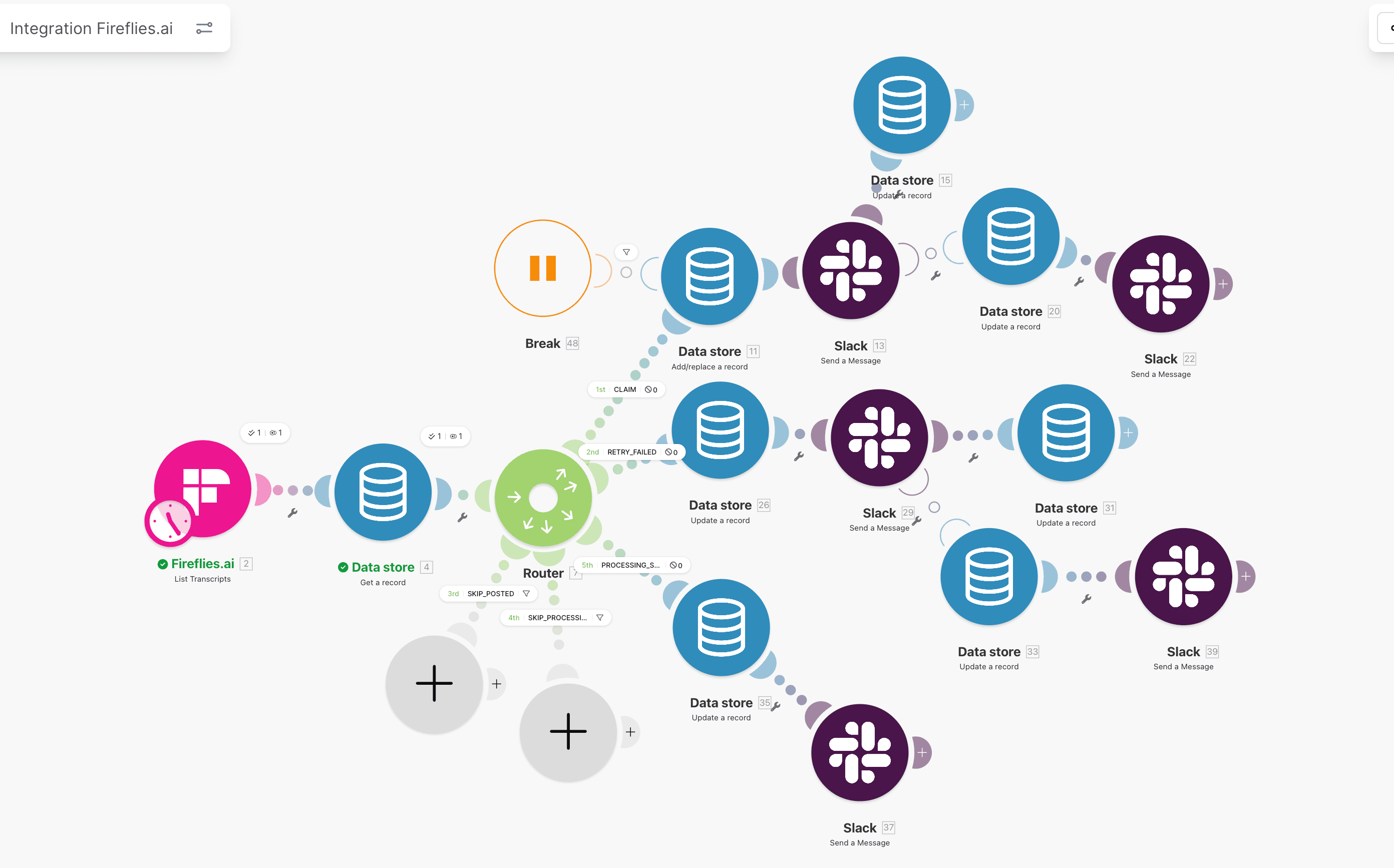
Router logic should reflect business state, not only module status.
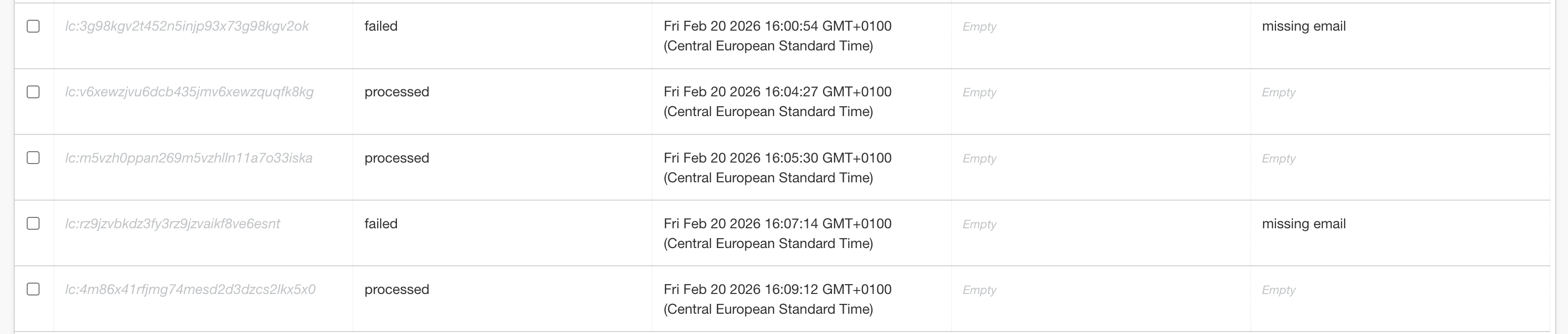
Step 3: Enforce status transitions
Status transitions must be explicit modules:
- set
processingbefore write, - set
completedafter confirmed success, - set
failedwith error details on handler path.
Explicit transitions make replay decisions and audits fast and defensible.
Step 4: Add error handler ownership
On any critical write failure:
- update ledger to
failed, - include error class and message,
- alert owner channel with
processing_id, - stop execution.
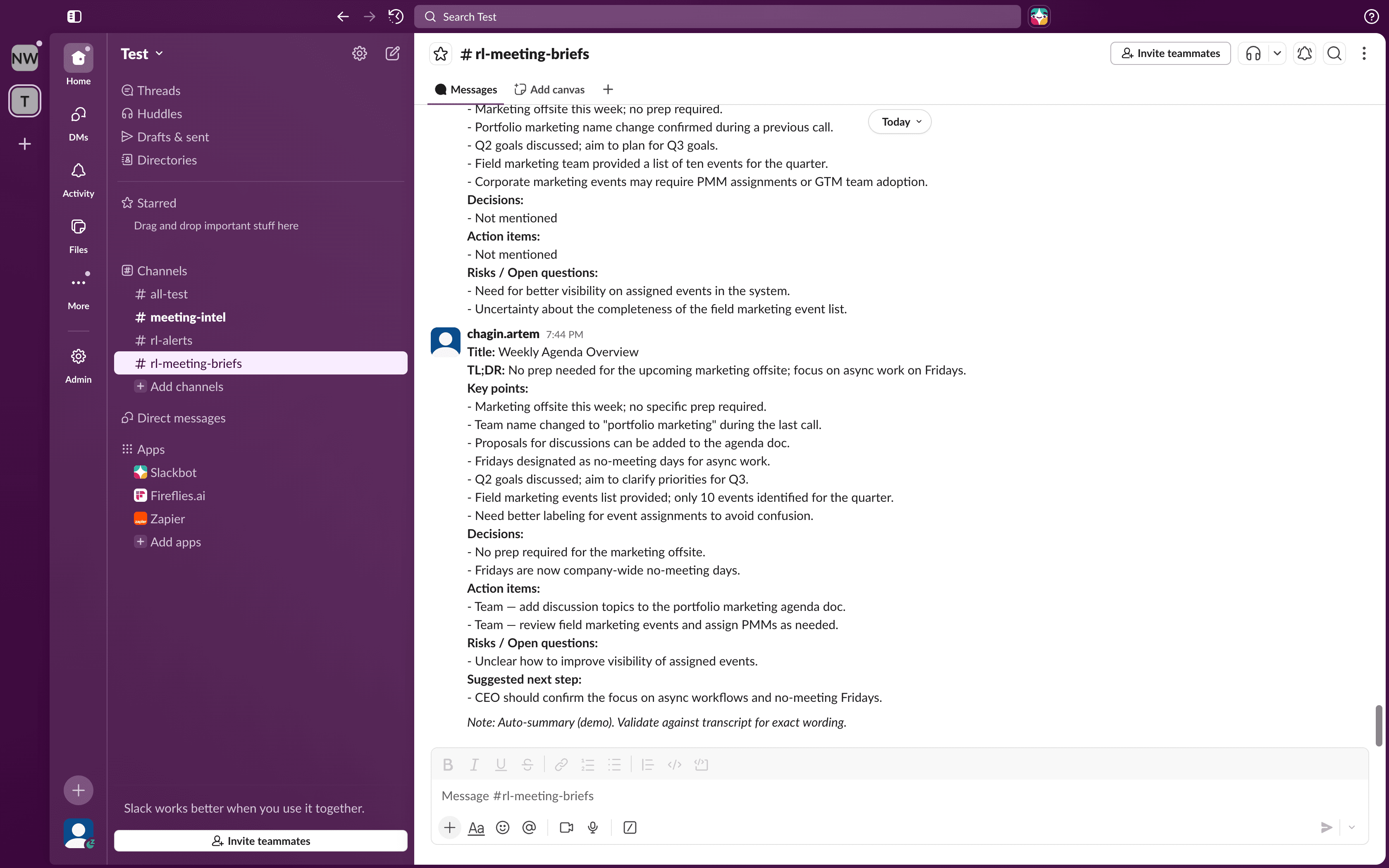
Write failure state first, then notify, then stop.
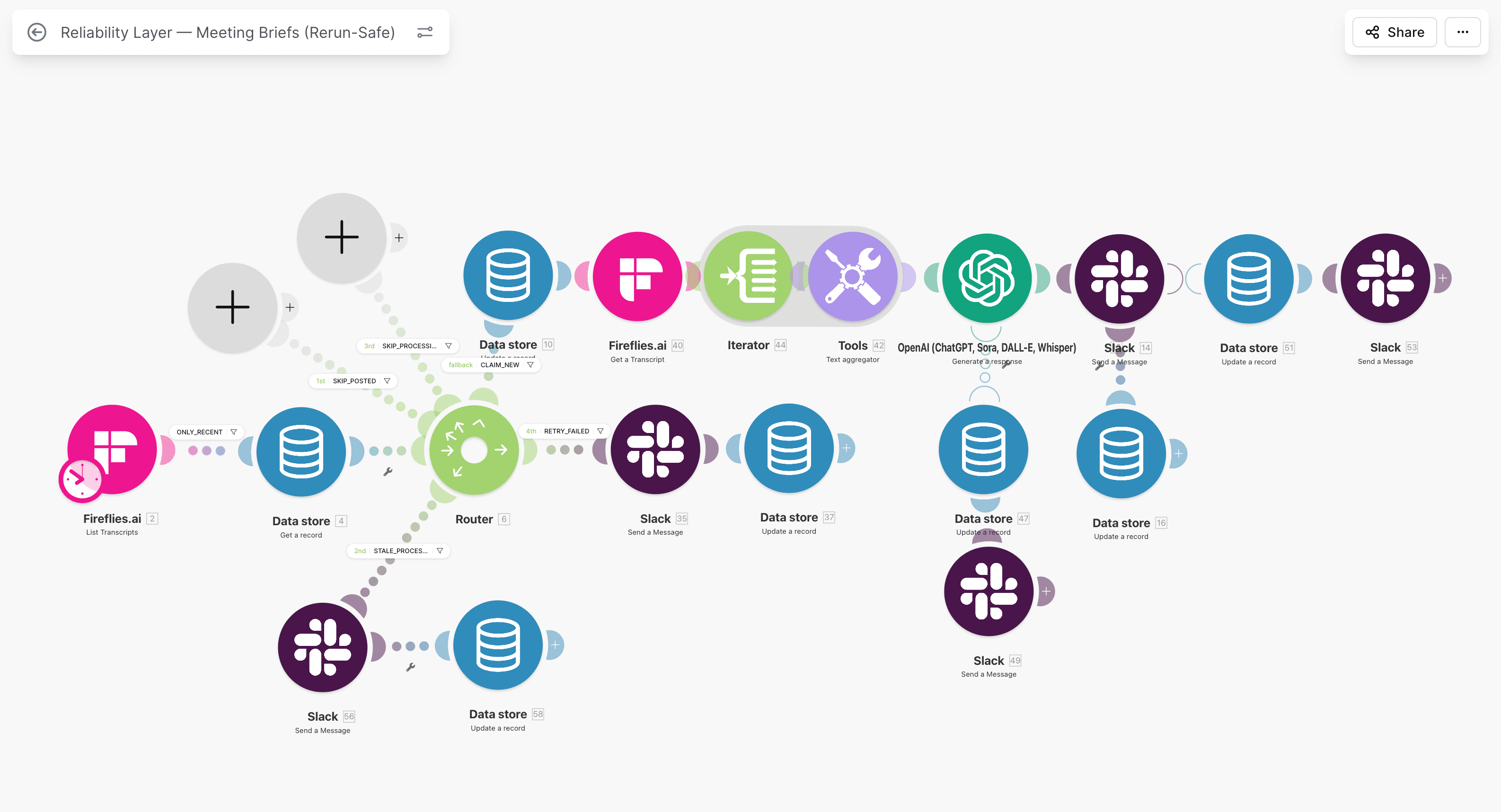
Step 5: Isolate retry queue
Use separate scheduled retry scenario:
- fetch
failedrecords, - replay deterministically,
- set
completedon success, - escalate to
dead_letterafter threshold.
Separate retry lane prevents noisy recovery logic in ingress scenario.
Validation tests before production
Run these tests before calling the lane stable:
| Test | What to do | Expected result |
|---|---|---|
| Duplicate webhook send | resend same event id twice | second run skipped, zero new writes |
| Downstream timeout | force delayed API response | one business write only |
| Partial branch failure | fail mid-scenario module | state failed, no duplicate side effects |
| Manual replay | replay one failed event | only missing step completes |
| Burst traffic | send 100 events quickly | backlog controlled, duplicate-created near zero |
If this matrix fails, do not ship yet.
Monitoring that keeps duplicate risk low
Daily metrics:
- duplicate-created count,
- duplicate-prevented count,
- failed backlog age,
- replay success rate,
- owner response time.
Weekly controls:
- sample 20 completed events end-to-end,
- review 10 duplicate-prevented events for false positives,
- verify no stale
processingrecords beyond timeout, - archive old completed rows by retention policy.
For monitoring baseline, use Make.com monitoring in production.
Permanent prevention model (not one-off cleanup)
A lot of teams do one cleanup sprint and call it solved. Duplicates return when a new scenario or field mapping is added without the dedupe contract.
Permanent prevention requires:
- shared key and state standards,
- code review checklist for any new write path,
- owner accountability for failed records,
- incident postmortem updates to dedupe contract,
- quarterly stress tests on retry and replay behavior.
This is where a reliability partner helps. If your lanes cross CRM and finance boundaries, Make.com error handling gives a fixed-scope rollout path.
Edge cases that still create duplicates if you ignore them
Even mature setups can leak duplicates when these cases are not handled explicitly.
Case 1: One person, multiple emails
If dedupe keys rely on email only, one person using two domains can bypass your checks. For B2B lanes, add secondary identity hints where possible, such as external user ID or company plus normalized name fingerprint.
Do not auto-merge aggressively. Use confidence tiers:
- high confidence: deterministic key match, safe merge path,
- medium confidence: queue for owner review,
- low confidence: leave separated and monitor.
Case 2: Payload order changes on resend
Some sources reorder JSON fields or omit optional fields on retries. If you hash raw payload text, the hash changes and duplicates bypass the key gate.
Safer approach:
- normalize field order before hash,
- exclude unstable fields from key material,
- include only business-stable identifiers.
Case 3: Multi-branch writes with one weak guard
Teams often protect one write branch and forget secondary branches such as task creation, lifecycle update, or notification persistence. A duplicate can be prevented in contact create but still appear in downstream objects.
Control rule:
- every external side effect branch must read and respect same
processing_idstate.
Case 4: Cleanup scripts that ignore ledger status
Manual cleanup jobs can reprocess records already marked completed and recreate side effects. Any remediation script should check ledger status before write, exactly like production scenario does.
How to recover when duplicates already exist
Prevention and cleanup are separate workstreams. If duplicates already exist, recover in phases.
Phase 1: freeze new duplicate creation.
- deploy dedupe gate and state controls first,
- confirm duplicate-created metric starts dropping.
Phase 2: classify existing duplicates.
- exact duplicates by deterministic key,
- probable duplicates for owner review,
- conflicting records requiring business decision.
Phase 3: clean in controlled batches.
- merge or archive in small windows,
- verify reporting and owner assignments after each batch,
- log every merge reason and operator.
Phase 4: harden anti-regression controls.
- lock key contract in runbook,
- require checklist before any new automation branch,
- keep weekly duplicate-prevented and duplicate-created review.
In finance-adjacent lanes, treat cleanup evidence like audit material. You can compare this approach with the operational control depth shown in VAT automation case.
Team implementation checklist (first 2 weeks)
Use this rollout if your team is starting from partial controls.
Week 1:
- map all write paths,
- define one idempotency key standard,
- implement Data Store lookup before first write,
- add failed-state alerts with owner assignment.
Week 2:
- isolate retry lane from ingress lane,
- run duplicate and replay test matrix,
- backfill monitoring dashboard for dedupe metrics,
- document replay and cleanup runbook.
Expected output by day 14:
- duplicate-created trend near zero,
- duplicate-prevented events visible and explainable,
- no unowned failed records older than SLA,
- operator playbook available for incidents.
FAQ
Does Make.com have built-in deduplication for webhooks?
Make.com provides building blocks, but not a complete event-level dedupe system by default. You still need a stable idempotency key, a state ledger, and explicit replay behavior to keep duplicate writes out of production data.
What is the best idempotency key for Make.com webhook flows?
Use a key derived from source intent: event ID, submission token, or deterministic payload hash from stable fields. Do not use execution IDs or timestamps, because those change across retries and break dedupe.
How do I prevent duplicate records when webhook fires twice?
Lookup processing_id before every critical write. If state is completed, skip. If processing, lock and exit safely. If missing, continue. This is the minimum reliable pattern for duplicate prevention.
Should I use search-then-create or always update existing records?
Use search-then-create with strict match criteria and allowed-field ownership. Blind create paths produce duplicates under retry pressure, while blind update paths can overwrite valid data. Controlled branching is safer.
What if duplicate records already exist in HubSpot?
Clean existing duplicates in phases, then deploy prevention controls before next volume cycle. If cleanup happens without prevention, duplicates come back quickly. Start with Typeform to HubSpot dedupe and owner runbooks.
Next steps
Cluster path
Make.com, Retries, and Idempotency
Implementation notes for retry-safe HubSpot-connected flows: Make.com, state, monitoring, and replay control.
Related guides
Continue with these articles to close adjacent reliability gaps in the same stack.
March 9, 2026
HubSpot Contact Creation Webhooks: Stop Duplicate Contacts
HubSpot contact creation webhooks can fire multiple create and property-change events in Make.com. Learn burst control, dedupe keys, and safe contact writes.
March 9, 2026
HubSpot Webhook Timeout in Make.com: 5-Second Limit and Safe ACK
HubSpot webhook timeout in Make.com starts when your endpoint misses the 5-second response window. Learn safe ACK, queue design, and duplicate prevention.
March 8, 2026
Replay Failed HubSpot Webhooks Without Duplicate Records
replay failed hubspot webhooks without duplicate records using state checks, targeted repair branches, and skip logic instead of blind reruns that rewrite CRM state.
Free checklist: Stripe Connect Ops Checklist
Get the PDF after submission. Use it to run through payout, verification, and triage checks when connected account behavior breaks in production.
Free 30-minute discovery call available after review. Paid reliability audit from €500 if fit is confirmed.
Next step
Need duplicate records to stop in Make.com, not just get cleaned later?
Stop the write path that creates the duplicates, then address backlog. Services and contact cover scoping and next steps.