
Make.com Data Store State Machine: Eliminate Replay Errors
make.com data store tracks event state when retries, failures, and replays hit production. This guide shows how to build a rerun-safe state machine fast.
Short on time
Start with the key sections below, then jump to FAQ for direct answers. If you need implementation help, use the contact button and I will map the shortest safe rollout path.
On this page (20)
- The problem: Make.com scenarios have no memory by default
- What "state machine" means in plain terms
- Why Make.com Data Store is the right place for workflow state
- Architecture overview
- Step 1: Create a Data Store schema that supports operations
- Step 2: Generate a stable processing_id
- Step 3: Lookup state before every side effect
- Step 4: Enforce explicit state transitions
- Step 5: Put error handling on the write path, not only at scenario level
- Step 6: Separate retry processing from main ingestion
- Step 7: Add lock protection for concurrent arrivals
- Copy-paste blueprint (router + Data Store row)
- Real implementation: Typeform to HubSpot with state tracking
- When you do not need this pattern
- Common mistakes that break state-machine reliability
- Pre-release verification checklist
- Operational metrics that prove this works
- FAQ
- Next steps
- Related reading
On this page
The problem: Make.com scenarios have no memory by default
Across dozens of production Make.com workflow fixes, duplicate writes and hidden retries were damaging CRM and finance operations. In almost every incident, the scenario logic looked reasonable in isolation, but there was no durable memory of what already happened for each business event.
That gap causes 3 operational failures:
- duplicate creates when the same webhook event is retried,
- partial completion when one module fails after earlier side effects,
- unsafe manual reruns that multiply damage instead of recovering state.
Make.com run history gives execution traces, but execution traces are not business state. If you need implementation context for how I run these fixes, start at About. If you already have retries creating real incidents, the relevant delivery lane is Make.com error handling.
Two recurring incident snapshots:
- Typeform to HubSpot intake: webhook retry windows replayed the same submission, so contact writes duplicated; source-keyed state gating blocked replay writes.
- Finance reconciliation lane: one side effect succeeded and the next failed; failed-state write plus owner alert made replay deterministic and safe.
The fix is to add explicit memory. In Make.com, the most practical way is a Data Store used as a state machine.
What "state machine" means in plain terms
You do not need academic computer science for this pattern.
A state machine here is just a strict record of where each business event currently sits. Every event gets one stable key. That key can move through allowed statuses only. When a replay or retry arrives, you do not guess. You look up state and route deterministically.
Minimal state model:
new: event accepted but not yet processed,processing: in-flight and not confirmed,completed: side effects confirmed,failed: processing stopped with known reason,dead_letter: retried and escalated for manual handling.
Allowed transitions are explicit:
new -> processing -> completed,processing -> failed,failed -> processing -> completed,failed -> dead_letter.
Anything else is blocked and logged. This alone removes most ambiguity during incidents.
Why Make.com Data Store is the right place for workflow state
Teams often ask if Google Sheets or Airtable can do the same job. They can store rows, but they are weak for state control inside high-frequency scenario execution.
| Option | Operational issue in production |
|---|---|
| Google Sheets | Slow under burst load, row-level race conditions, fragile concurrent writes. |
| Airtable | Extra API dependency, rate limits, external outage can block critical path. |
| Make.com Data Store | Native, low-latency in-scenario access, fewer moving parts. |
For production reliability, every extra API dependency increases incident surface area. A Data Store keeps state tracking in the same runtime as your scenario logic. That reduces failure modes and simplifies debugging.
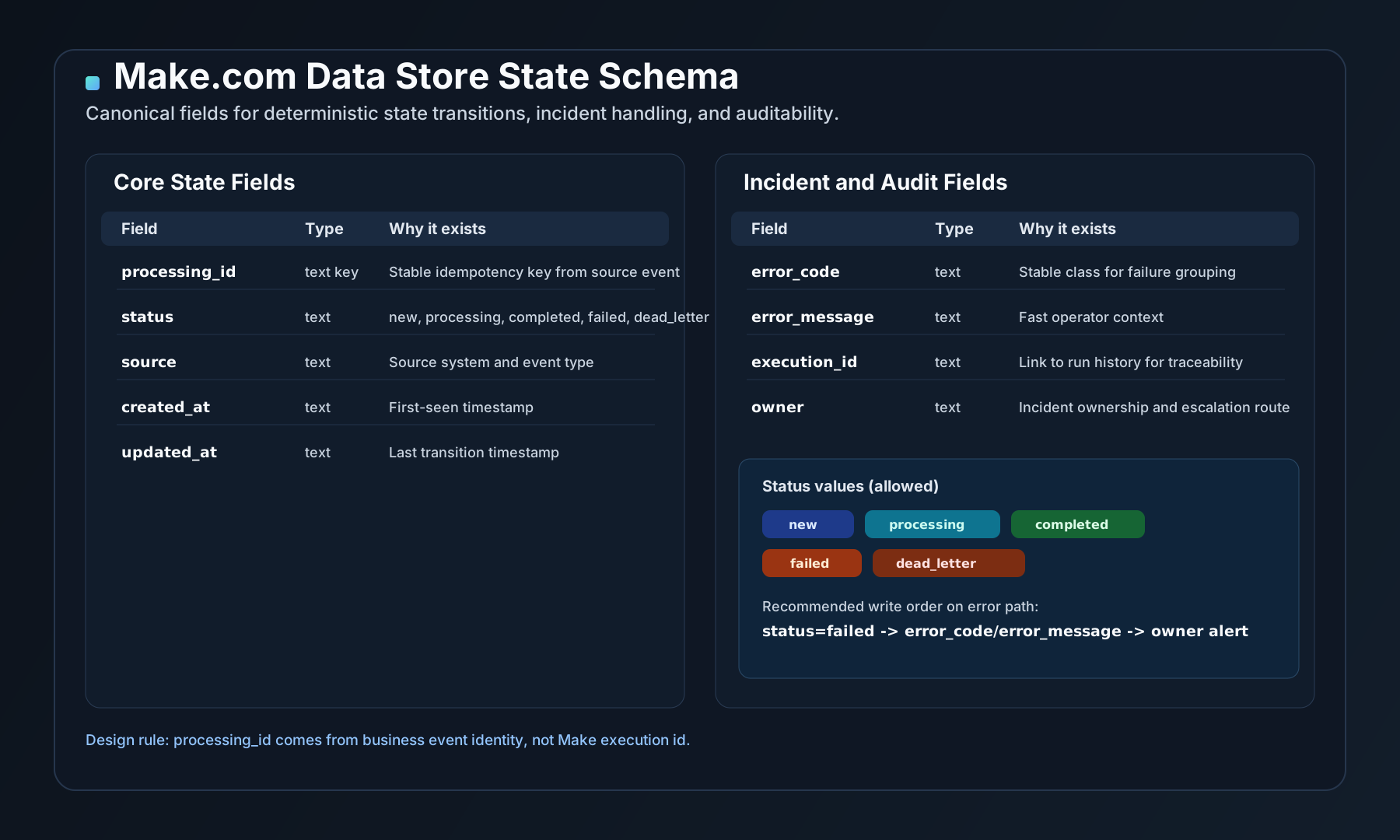
This schema diagram matches the exact field model used in this guide.
Architecture overview
Use this routing shape as baseline:
Trigger (webhook or schedule)
  -> Normalize payload
  -> Generate processing_id from source event
  -> Lookup processing_id in Data Store
      -> completed: skip + log duplicate-prevented
      -> processing: skip + lock-protection log
      -> failed: route to controlled retry path
      -> not found: create state row and continue
  -> Set status=processing
  -> Execute write actions (CRM, ERP, billing, alerts)
      -> success: set status=completed + updated_at
      -> failure: set status=failed + error + owner alert
Two design rules matter most:
processing_idmust come from source data, never Make execution ID.- State update must happen before alert send on failure branch.
If alert send fails first and state is not written, you lose incident truth.
Step 1: Create a Data Store schema that supports operations
Name the store by workflow lane, for example hubspot_intake_state or invoice_sync_state. Avoid one giant global store without partitioning.
Minimum fields:
| Field | Type | Why it exists |
|---|---|---|
processing_id | text key | Deterministic idempotency key. |
status | text | new, processing, completed, failed, dead_letter. |
source | text | Source system and event type. |
created_at | text | First-seen timestamp. |
updated_at | text | Last transition timestamp. |
error_code | text | Stable class for failure grouping. |
error_message | text | Fast operator context. |
execution_id | text | Trace link to Make run history. |
owner | text | Incident ownership route. |
This schema is intentionally small. It supports both dedupe and incident operations without becoming a warehouse.
Step 2: Generate a stable processing_id
The key must represent business intent, not technical attempt.
Good key sources:
- Typeform submission ID,
- HubSpot event ID,
- invoice number plus source system ID,
- deterministic hash of normalized payload fields.
Bad key source:
- Make execution ID (changes on retry),
- current timestamp alone,
- random UUID generated per run.
In one finance reconciliation lane, I inherited keys based on execution timestamp. Same invoice event generated new keys on every retry, so dedupe never triggered. Converting key logic to source invoice ID removed duplicate write incidents in the first week.
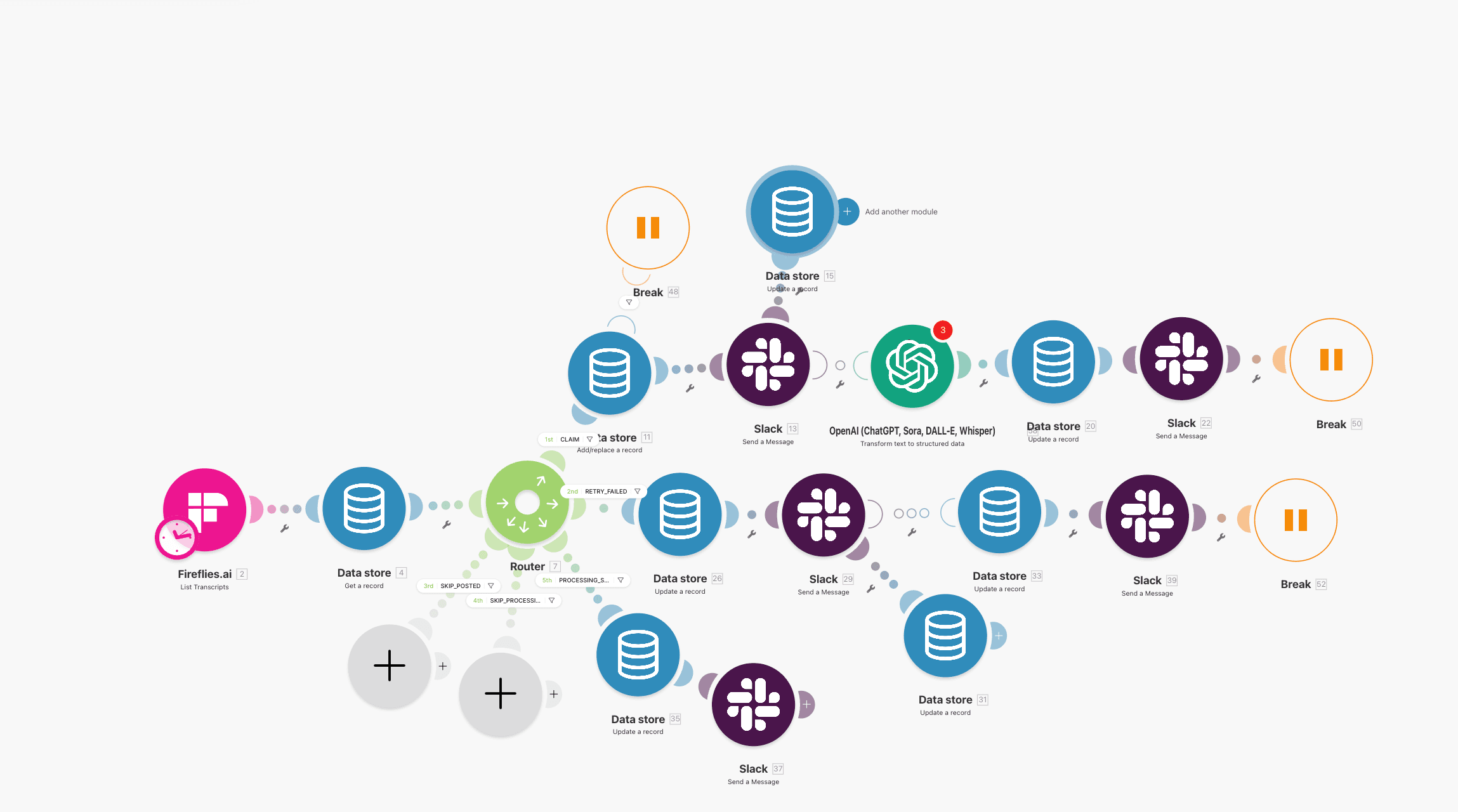
Generate processing_id before routing so every branch uses the same key.
Step 3: Lookup state before every side effect
Do not write first and reconcile later. Always check state before each critical write.
Routing policy:
- If record exists with
completed: skip write, logduplicate_prevented=true. - If record exists with
processing: skip or delay. This protects against overlap and lock contention. - If record exists with
failed: route to retry branch, do not re-enter normal happy path blindly. - If record not found: create row, then continue.
This is the core idempotency gate. Without it, retries and manual reruns remain unsafe even if downstream APIs are stable.
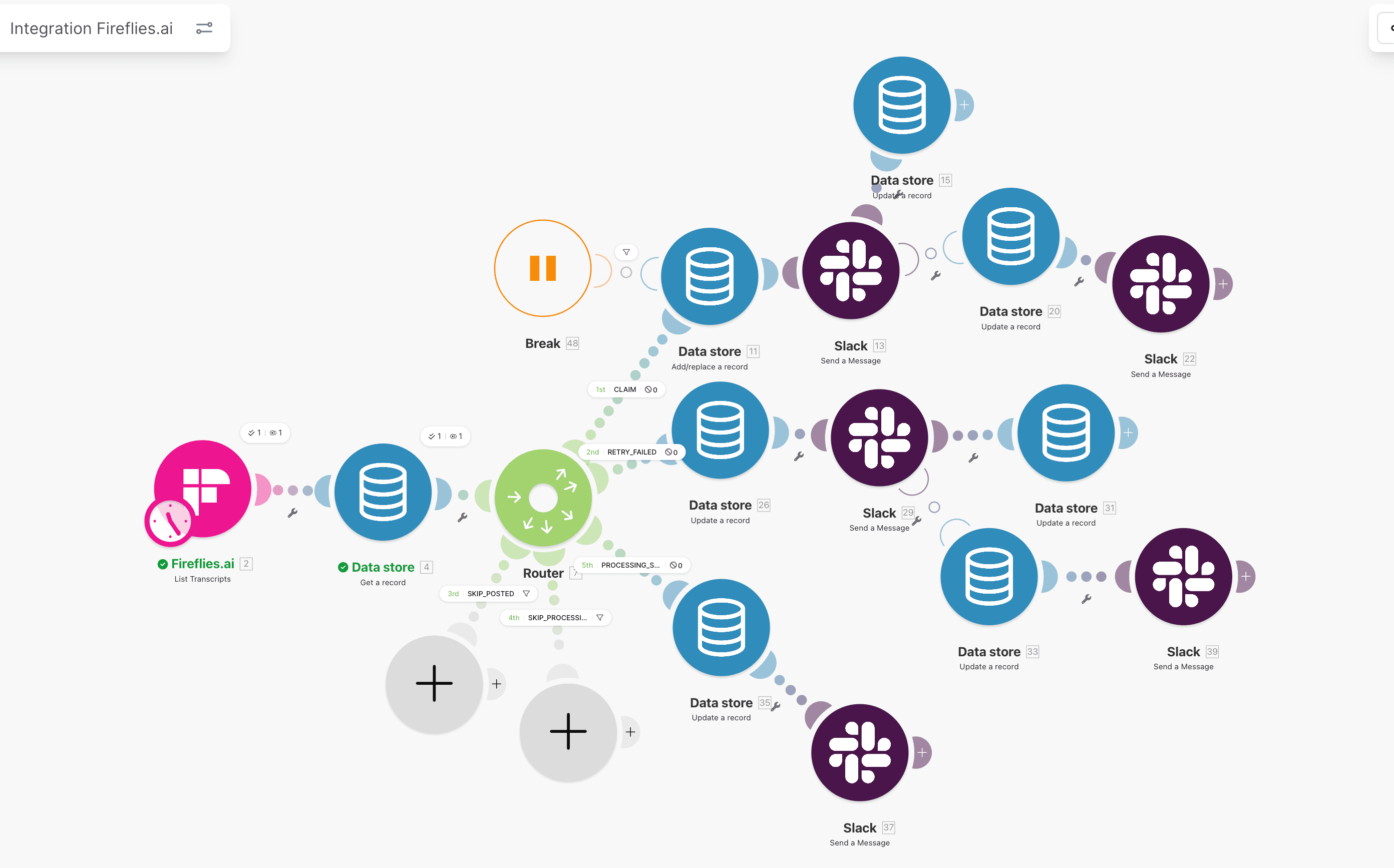
Status-aware routing is the control point that prevents duplicate writes under retry pressure.
Step 4: Enforce explicit state transitions
Update state at three mandatory points:
- Before first write action:
status=processing. - After confirmed success:
status=completed. - On failure handler:
status=failedplus error details.
If these updates are inconsistent, your ledger stops being trustworthy. Teams then fall back to manual interpretation of run logs, which is exactly what this pattern is meant to avoid.
Add transition guards:
- reject
completed -> processingunless manual replay flag is present, - reject
processing -> new, - reject direct
new -> completedwithout write confirmation.
You can enforce guards with branch conditions before Update record modules.
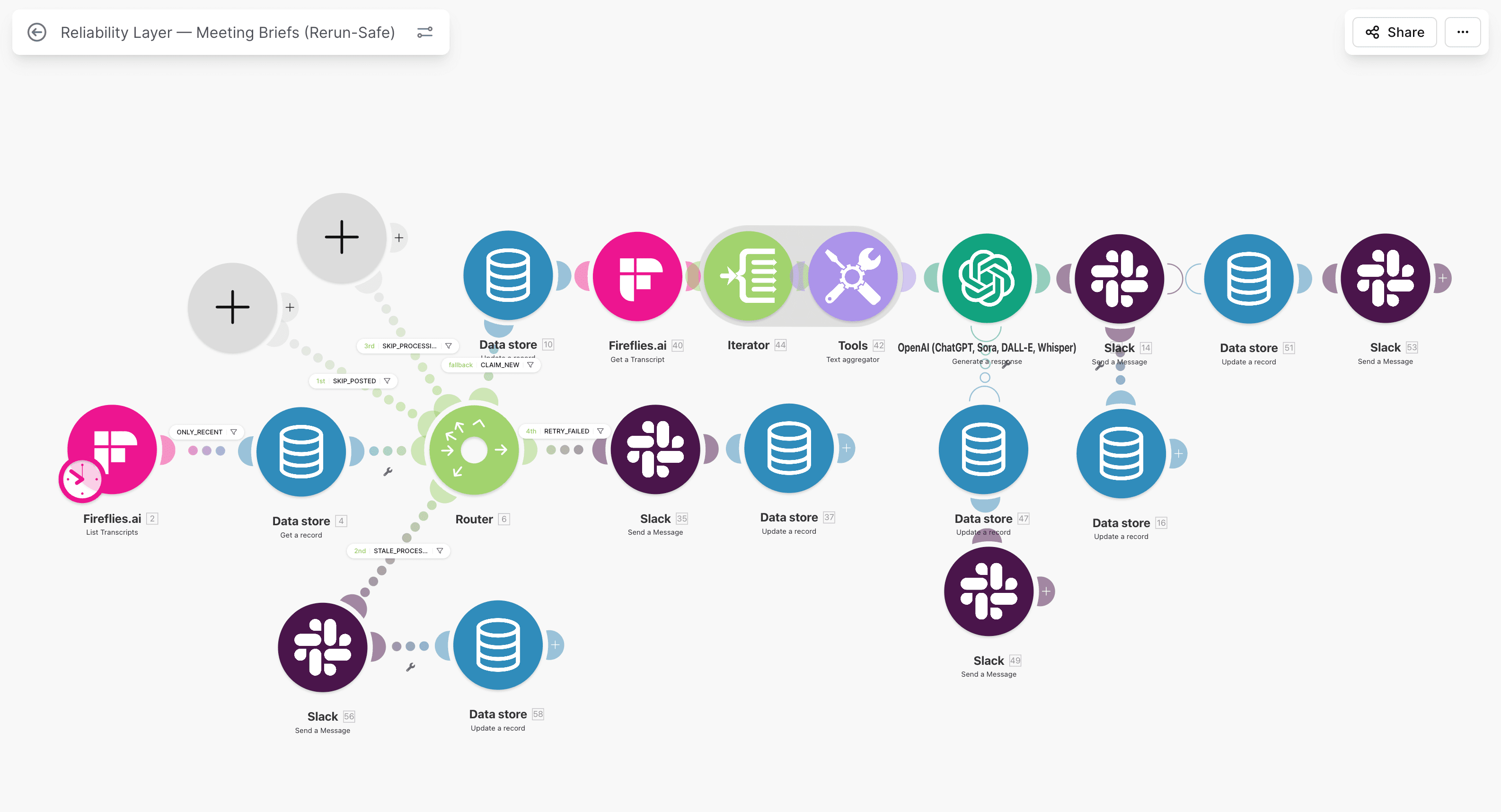
Transition modules should be explicit and auditable, not implicit side effects.
Step 5: Put error handling on the write path, not only at scenario level
Scenario-level failure notifications are too broad. You need branch-level failure context tied to the same processing_id.
Failure branch sequence:
- Capture module error context.
- Update Data Store to
failedwitherror_codeanderror_message. - Send Slack or email alert with owner, key, source, and link to run.
- Stop branch.
Alert payload should answer operational questions immediately:
- What failed?
- Which record is affected?
- Who owns it?
- Is replay safe now?
If the answer is missing, alert quality is low and mean time to resolution will stay high.
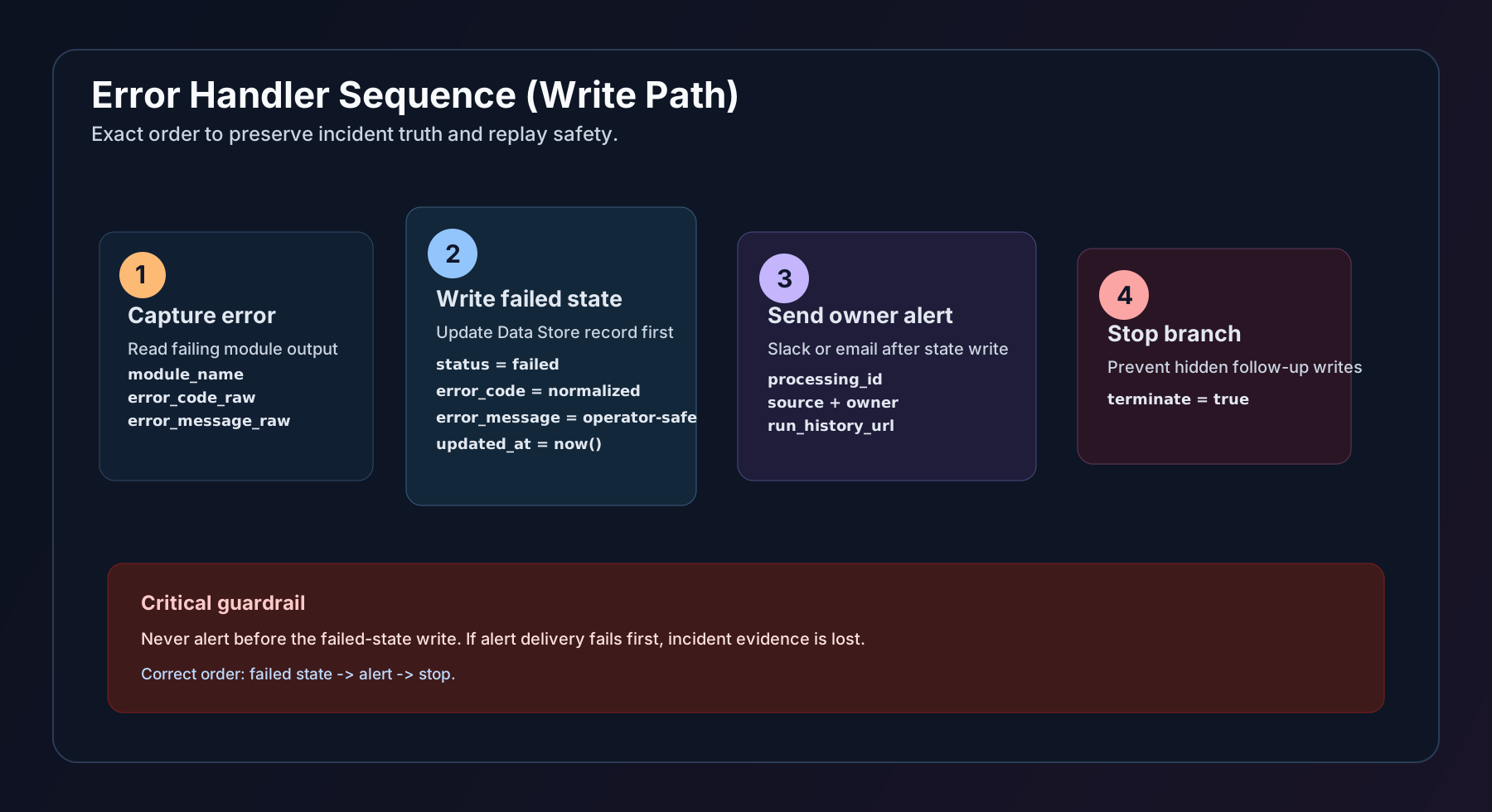
Required order is explicit: failed-state write, then alert, then stop.
Step 6: Separate retry processing from main ingestion
Do not cram complex retry rules inside the main scenario. Keep main flow focused on first-pass processing and route failures to a dedicated retry scenario.
Retry scenario pattern:
- schedule every hour,
- search Data Store for
status=failedand retry count below threshold, - replay deterministic business step using same
processing_id, - on success set
completed, - on repeated failure set
dead_letterand escalate.
This keeps ingestion fast and makes retry behavior observable.
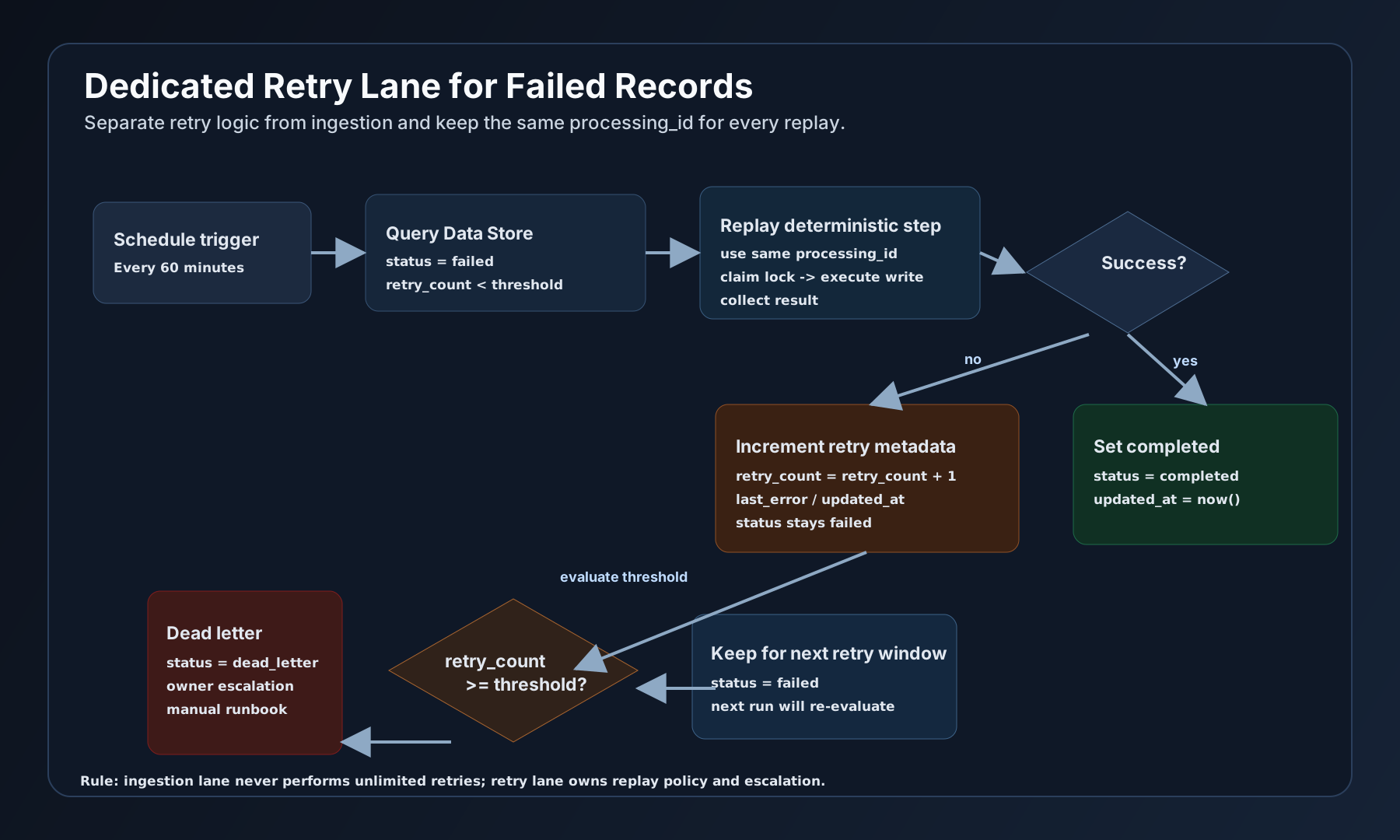
Retry logic is isolated from ingestion and escalates to dead letter after threshold.
Step 7: Add lock protection for concurrent arrivals
State machines fail if concurrent runs both think they own the same event. Add lock-like semantics with processing state and short timeout windows.
Practical approach:
- first run sets
processingwith timestamp, - second run encountering
processingexits as duplicate or waits, - stale
processingrows older than threshold are moved tofailedand reviewed.
In a marketing intake lane, this removed duplicate task creation during campaign spikes where webhook arrivals overlapped heavily.
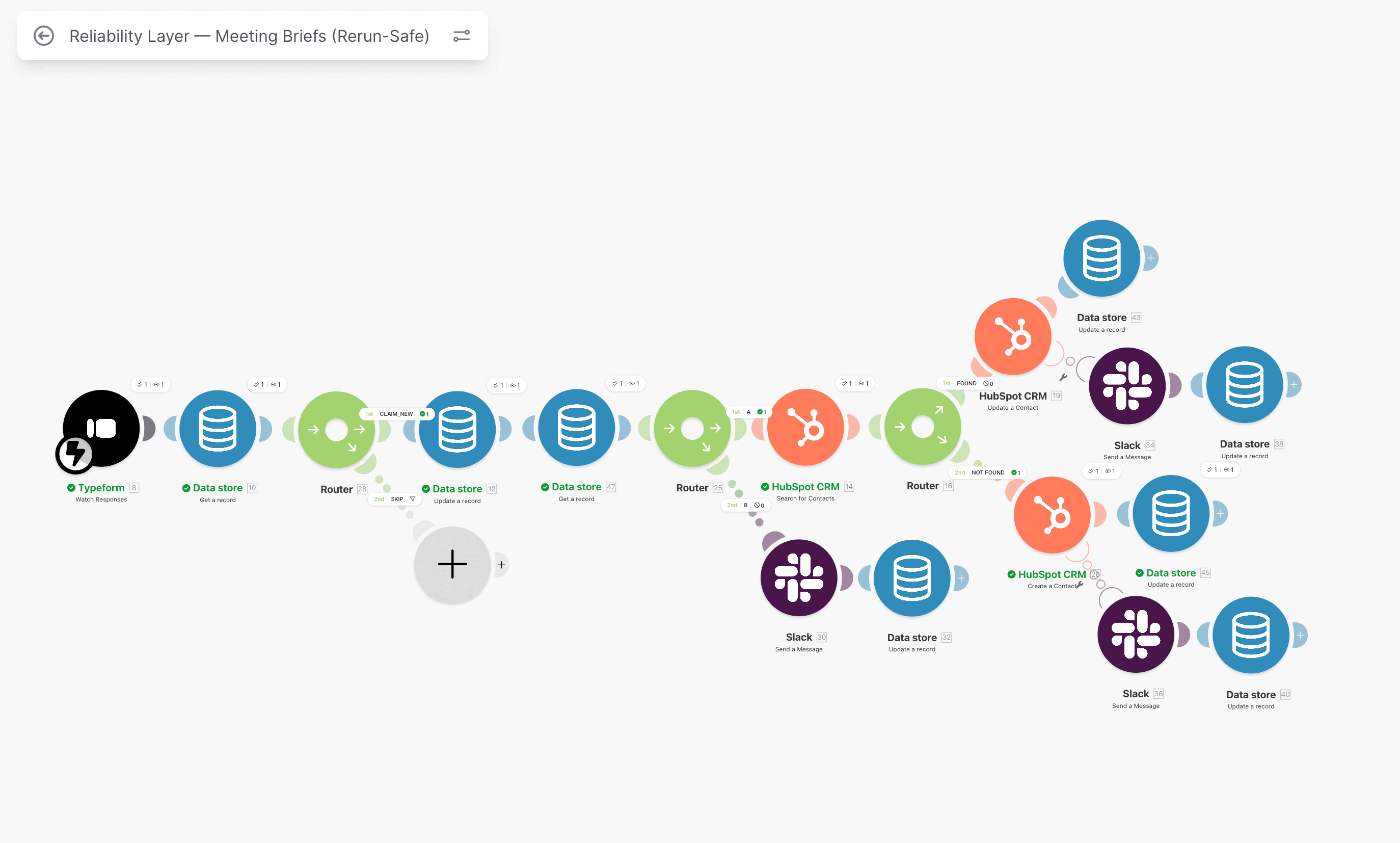
Concurrent protection is required when webhook bursts hit the same key repeatedly.
Copy-paste blueprint (router + Data Store row)
Use this as a first-pass runbook baseline:
processing_id = build_from_source_event(payload)
record = data_store.get(processing_id)

if record.status == "completed":
  log("duplicate_prevented", processing_id)
  stop

if record.status == "processing":
  log("lock_protection", processing_id)
  stop

if record.status == "failed":
  route_to_retry_lane(processing_id)
  stop

if record not found:
  data_store.create({
    processing_id,
    status: "new",
    source,
    created_at: now(),
    updated_at: now(),
    execution_id,
    owner
  })

data_store.update(processing_id, { status: "processing", updated_at: now() })

try:
  run_external_writes(payload)
  data_store.update(processing_id, {
    status: "completed",
    error_code: "",
    error_message: "",
    updated_at: now()
  })
except err:
  data_store.update(processing_id, {
    status: "failed",
    error_code: normalize(err),
    error_message: operator_safe(err),
    updated_at: now()
  })
  alert_owner(processing_id, owner, execution_id, err)
  stop
Reference row shape:
{
  "processing_id": "source_event_key",
  "status": "new",
  "source": "typeform.submit",
  "created_at": "2026-03-05T10:20:00Z",
  "updated_at": "2026-03-05T10:20:00Z",
  "error_code": "",
  "error_message": "",
  "execution_id": "make_run_12345",
  "owner": "revops_oncall"
}
Real implementation: Typeform to HubSpot with state tracking
Here is a concrete runbook pattern based on a real lane similar to Typeform to HubSpot dedupe:
- Typeform webhook arrives.
- Normalize payload and compute
processing_id=submission_id. - Search Data Store.
- If not found, create state row with
newand metadata. - Set state to
processing. - Check HubSpot for existing contact by email plus external id.
- Create or update contact.
- On success set state
completedwith timestamp. - On failure set state
failed, push owner alert, stop.
Before state machine:
- repeated submissions created duplicate contacts,
- failed handoffs were discovered late,
- manual replay caused more duplicates.
After state machine:
- duplicate writes were blocked by key,
- failed records were visible immediately,
- replay became deterministic and low risk.
If your current intake and lifecycle flows already show these symptoms, this is usually the right time to review HubSpot workflow audit: 7 silent failures alongside Make.com retry logic.
When you do not need this pattern
Use this model where reliability and replay safety matter. Skip it when complexity does not pay back.
Usually not needed:
- personal automations with no external writes,
- one-off migration scripts,
- low-value prototypes where duplicate side effects are acceptable.
Usually required:
- scenarios writing to CRM, ERP, billing, or finance systems,
- workflows with webhook retries or burst traffic,
- processes with audit requirements,
- any lane where duplicate writes have business cost.
A simple decision rule:
- if duplicate write has near-zero cost, keep it simple,
- if duplicate write creates cleanup and trust cost, add state machine now.
Common mistakes that break state-machine reliability
Mistake 1: Using execution_id as the primary key
Execution ID changes every retry. Deduplication fails by design. Use source-derived keys.
Mistake 2: Updating state only at the end
If a module fails before final update, records stay ambiguous. Update state before and after critical operations.
Mistake 3: No handling for processing status
Concurrent runs collide and both proceed. Always route processing to lock-safe path.
Mistake 4: Alerting before failed-state write
If notification fails, incident evidence disappears. Write state first, alert second.
Mistake 5: No retention policy
State tables grow forever, search performance degrades, and operations slow down. Archive completed rows by age.
Pre-release verification checklist
Run this before marking the scenario production-ready:
-
processing_idcomes from source event and is deterministic. - Every external write has a state lookup gate.
-
processing,completed, andfailedtransitions are explicit. - Error handler writes failed state before sending alerts.
- Retry lane exists for failed rows with threshold and escalation.
- Concurrent arrivals with same key are tested and safe.
- Duplicate webhook simulation does not create duplicate downstream writes.
- Manual replay of a failed item completes missing side effect only once.
For full cross-system checks, use the free 12-point checklist. If you want direct implementation help, use Contact.
Operational metrics that prove this works
Architecture is not enough. You need measurable outputs.
Track at minimum:
- duplicate-created count,
- duplicate-prevented count,
- failed backlog older than SLA,
- median owner response time,
- replay success rate,
- dead-letter volume per week.
If duplicate-created is not near zero after rollout, inspect key design and branch gates first. In most cases, key instability or missed write-path gating is the root cause.
For finance-critical lanes, compare with outcomes in the VAT automation case, where rerun safety and explicit ownership are non-negotiable.
FAQ
Is Make.com Data Store reliable enough for production state tracking?
Yes, for many B2B automation lanes it is reliable enough when schema, key design, and transition rules are explicit. The failures I see usually come from weak key logic or missing branch controls, not from Data Store itself. If your volume is extreme, partition by workflow and retention window.
Should I keep automatic retries enabled in Make.com modules?
Keep automatic retries only where operations are safely idempotent. For write-heavy branches, controlled retries through state-machine logic are safer because they preserve ownership and avoid hidden duplicate side effects. Do not assume "retry equals safe" without explicit state checks.
How many states do I actually need to start?
Start with new, processing, completed, and failed. Add dead_letter when you need escalation after repeated failures. More states are not automatically better. Clear transitions and ownership are more important than a complex status model.
How do I explain this pattern to non-technical ops stakeholders?
Use business language: every incoming event gets a tracking card, and that card can only move through approved statuses. This prevents duplicate actions and makes failures visible with owner accountability. Most stakeholders understand this model quickly when shown one real incident timeline.
Next steps
If your Make.com workflows are already creating retries and duplicate risk:
- Get the free 12-point reliability checklist
- Review Make.com retry logic without duplicates
- Review HubSpot workflow audit: 7 silent failures
- Review Make.com monitoring in production
- See Make.com error handling service
- If you want a direct assessment, use Contact
Related reading
Cluster path
Make.com, Retries, and Idempotency
Implementation notes for retry-safe HubSpot-connected flows: Make.com, state, monitoring, and replay control.
Related guides
Continue with these articles to close adjacent reliability gaps in the same stack.
March 5, 2026
Make.com Duplicate Prevention: Stop Duplicate Records on Retry
Make.com duplicate prevention stops duplicate records when webhook retries, reruns, or manual replays fire twice. Learn Data Store gates and safe replay.
March 5, 2026
Make.com Retry Logic: Replay Failed Webhooks Without Duplicates
Make.com retry logic must survive timeouts, retries, and manual replay without creating duplicate CRM or finance writes. Learn the production-safe pattern.
March 9, 2026
HubSpot Contact Creation Webhooks: Stop Duplicate Contacts
HubSpot contact creation webhooks can fire multiple create and property-change events in Make.com. Learn burst control, dedupe keys, and safe contact writes.
Free checklist: Stripe Connect Ops Checklist
Get the PDF after submission. Use it to run through payout, verification, and triage checks when connected account behavior breaks in production.
Free 30-minute discovery call available after review. Paid reliability audit from €500 if fit is confirmed.
Need reliability work in production?
Book a scoping call. I map the highest-risk lane and confirm fit before a paid audit. Start with a free 30-minute audit-scoping call. Paid reliability audit starts from €500 if fit is confirmed.