
HubSpot + Typeform Reliability Setup: Prevent Data Loss
hubspot typeform integration often creates duplicates and missed submissions under retries. This guide shows a safe setup with dedupe, logging, and alerts.
Short on time
Start with the key sections below, then jump to FAQ for direct answers. If you need implementation help, use the contact button and I will map the shortest safe rollout path.
On this page (16)
- The default integration breaks in 3 ways
- Why native Typeform to HubSpot wiring is not enough
- Architecture overview
- Step 1: Configure Typeform webhook with retry awareness
- Step 2: Build Make.com scenario with explicit state tracking
- Step 3: Add deterministic dedupe in HubSpot before any create
- Step 4: Map fields with validation gates, not direct passthrough
- Step 5: Error handling and alerts with clear ownership
- Step 6: Add a practical monitoring loop
- Step 7: Test failure scenarios before go-live
- Before and after reliability profile
- Maintenance runbook (lightweight but strict)
- Common implementation mistakes and how to avoid them
- Decision boundary: when this full setup is required
- FAQ
- Next steps
On this page
The default integration breaks in 3 ways
I have rebuilt HubSpot + Typeform integration lanes for production teams, and the same three incident classes appear every time teams rely on default connections without production controls. The stack looks fine in week one, then CRM trust drops as duplicates, silent drops, and missing ownership start compounding.
The three failures are predictable:
- duplicate contacts from webhook retries,
- lost submissions during API or mapping errors,
- zero visibility when processing fails.
Native connection docs focus on setup speed, not incident behavior under retries and partial failure. That gap is why teams discover problems late, usually when pipeline or handoff reports stop reconciling.
This guide is written as an operator runbook. If you want context on how I execute these implementations, see About. If you need direct help for your environment, use Contact. For a concrete production case with numbers, review Typeform to HubSpot dedupe.
Why native Typeform to HubSpot wiring is not enough
Native wiring is useful for quick starts, but it is weak for high-reliability production lanes where every inbound event must be traceable and replay-safe.
Typical gaps:
- no explicit idempotency key across retries,
- no state ledger that tracks each submission lifecycle,
- no branch-level error ownership,
- no deterministic replay workflow.
A lane can look healthy in UI status while business state is wrong. For example, one run writes contact creation, then follow-up branch fails, then retry duplicates create path. Platform success counters still look acceptable.
For production use, route Typeform webhooks through Make.com with state controls and monitoring. The architecture below gives you that reliability layer without adding unnecessary complexity.
Architecture overview
Typeform submission
  -> Make.com webhook trigger
  -> Normalize payload + generate processing_id (submission_id)
  -> Data Store lookup by processing_id
      -> completed: skip + log duplicate prevented
      -> processing: skip + lock-protection path
      -> failed: route to controlled retry
      -> missing: create state row
  -> Set state=processing
  -> HubSpot search by email + external id
      -> found: update contact
      -> not found: create contact
  -> Set state=completed
  -> On any error: set state=failed + send owner alert + stop
This design adds exactly what default setups miss: memory, deterministic routing, and ownership.
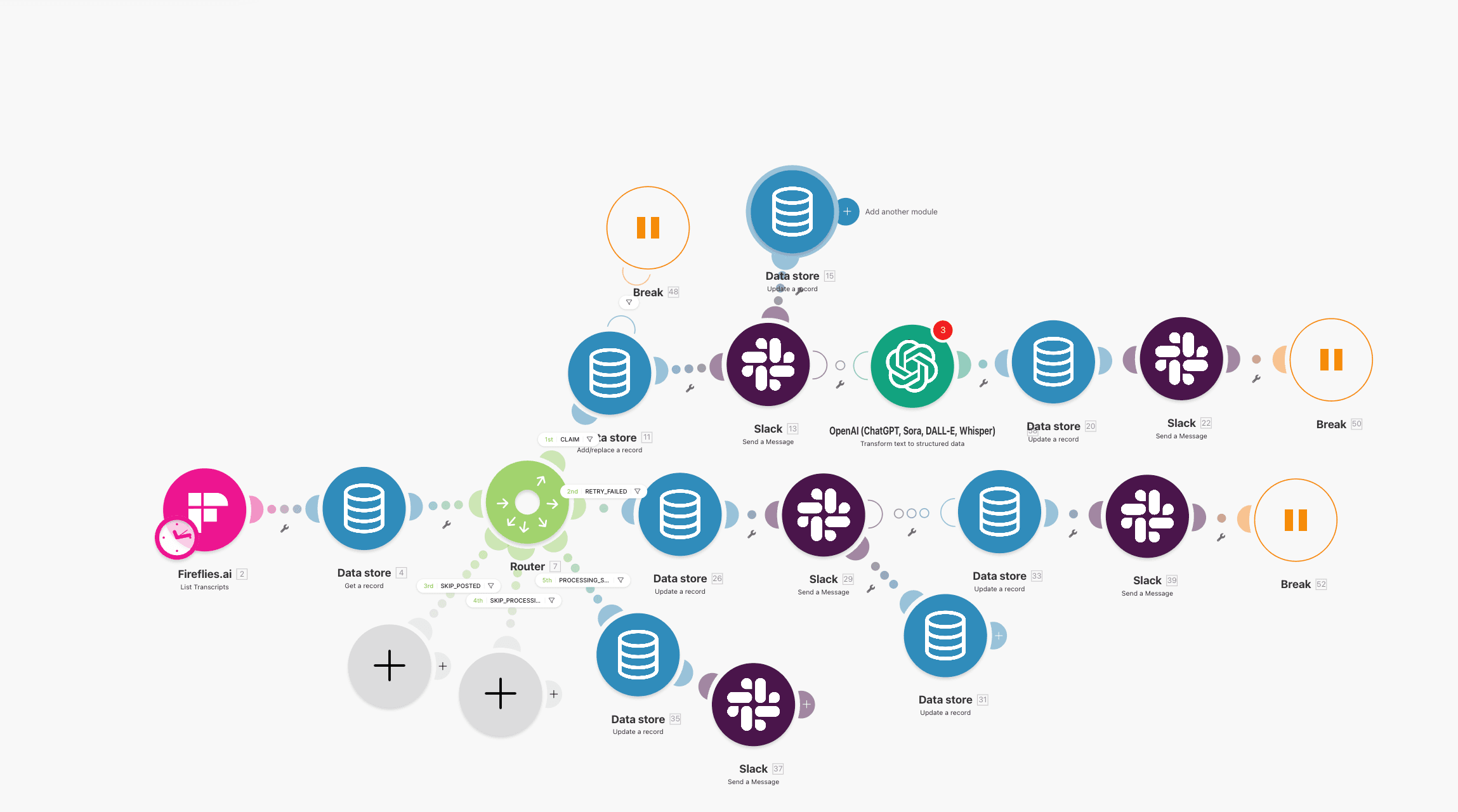
Webhook source configuration should be verified before you test retry behavior.
Step 1: Configure Typeform webhook with retry awareness
Set the webhook endpoint to your Make.com custom webhook URL and validate payload shape using real test submissions, not only sample data.
What to validate immediately:
- submission token is present and stable,
- email field is mapped and not optional by accident,
- timestamp is included for traceability,
- payload schema version is documented.
Critical note: Typeform can resend events when delivery acknowledgment is delayed. If your downstream scenario treats each resend as new intent, you will create duplicate contacts.
Practical rule:
- webhook source is at-least-once delivery,
- downstream lane must be idempotent by design.
If you are not sure your current lane handles this, compare your setup to the control model in Make.com retry logic.
Step 2: Build Make.com scenario with explicit state tracking
Do not go directly from webhook to HubSpot create action. Insert a state control layer first.
Baseline modules:
- Webhook trigger,
- Normalize payload,
- Set
processing_id=submission_token, - Data Store lookup,
- Status router,
- HubSpot search and write branch,
- Status update,
- Error handler.
State routing policy:
completed: skip and log duplicate prevented,processing: skip with lock signal,failed: route to retry queue,- missing record: create new row and continue.
This is the same pattern fully documented in Make.com Data Store as a state machine.
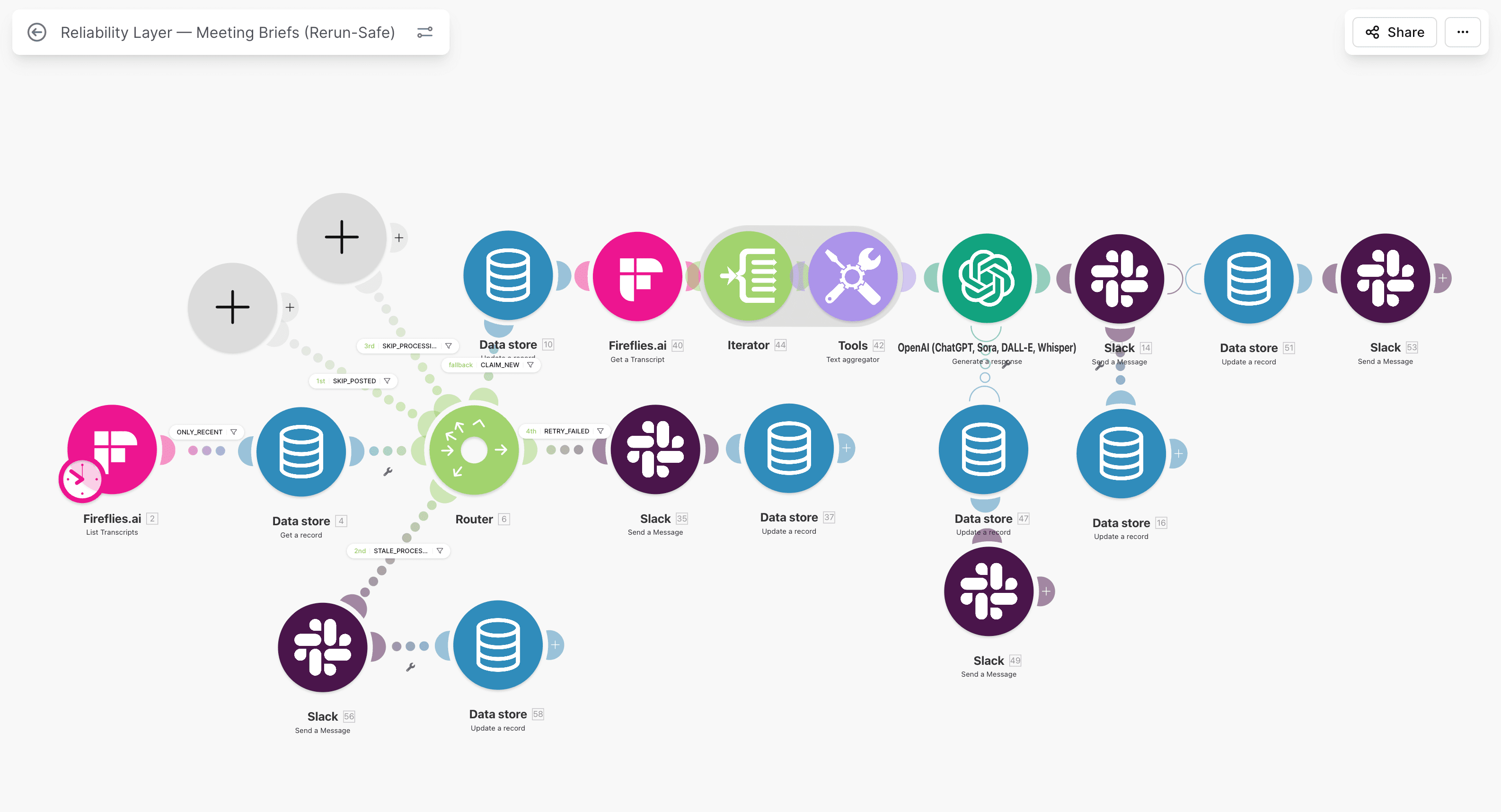
State transitions should be explicit modules, not implied behavior.
Step 3: Add deterministic dedupe in HubSpot before any create
Before creating a contact, search HubSpot with deterministic identity criteria.
Recommended query strategy:
- primary: normalized email,
- secondary: external submission id stored in a custom property,
- optional tertiary: source plus external id composite key.
Routing logic:
- If contact exists: update only approved fields.
- If not found: create contact and attach source metadata.
Never run a blind create action from form submissions in production. Blind create plus retry behavior guarantees duplicates.
For deeper duplicate control strategy, use How to Prevent Duplicate Contacts in HubSpot Workflows.
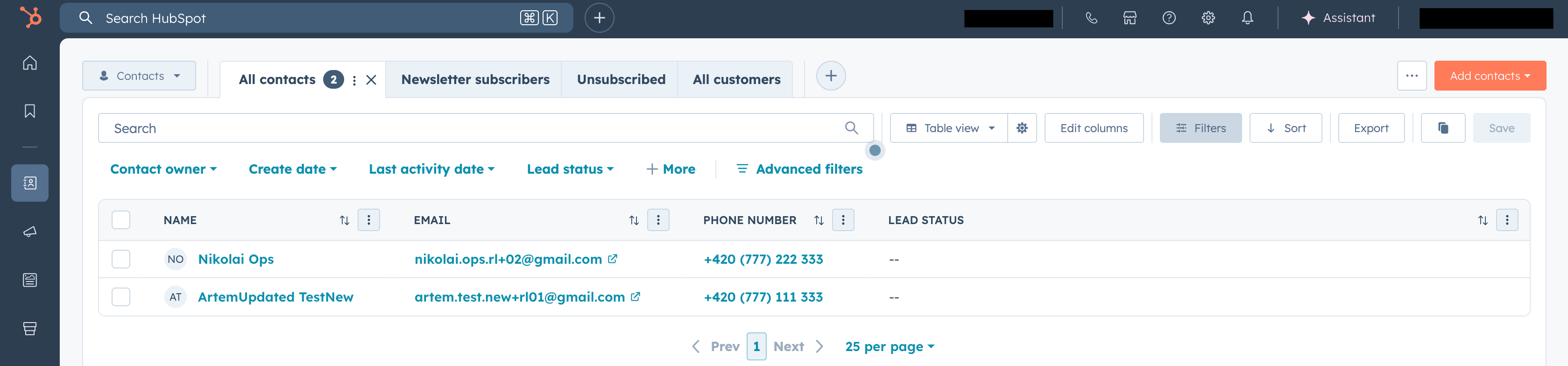
Search-first logic is the boundary between controlled ingestion and duplicate creation.
Service path
Need ops help beyond this article?
Current client work is Stripe Connect operations. See services for payout, triage, and verification lanes.
Step 4: Map fields with validation gates, not direct passthrough
Field mapping errors are a major source of silent bad state. The lane may execute, but contact quality degrades and reporting reliability drops.
Use a mapping contract table and enforce required-field checks before write.
| Typeform field | HubSpot property | Control to enforce |
|---|---|---|
email | Required, normalized lowercase, reject empty. | |
| Full name | firstname + lastname | Split safely, fallback rules documented. |
| Phone | phone | Format normalization before write. |
| Company | company | Optional, but do not overwrite known value with empty. |
| Consent | Custom consent property | Explicit mapping, audit trail retained. |
| Submission token | External id property | Required for replay traceability. |
Validation branch rules:
- missing email -> fail path with alert, no create,
- malformed payload -> fail path with owner routing,
- unsupported schema version -> quarantine branch.
Without validation gates, you trade setup speed for downstream cleanup cost.
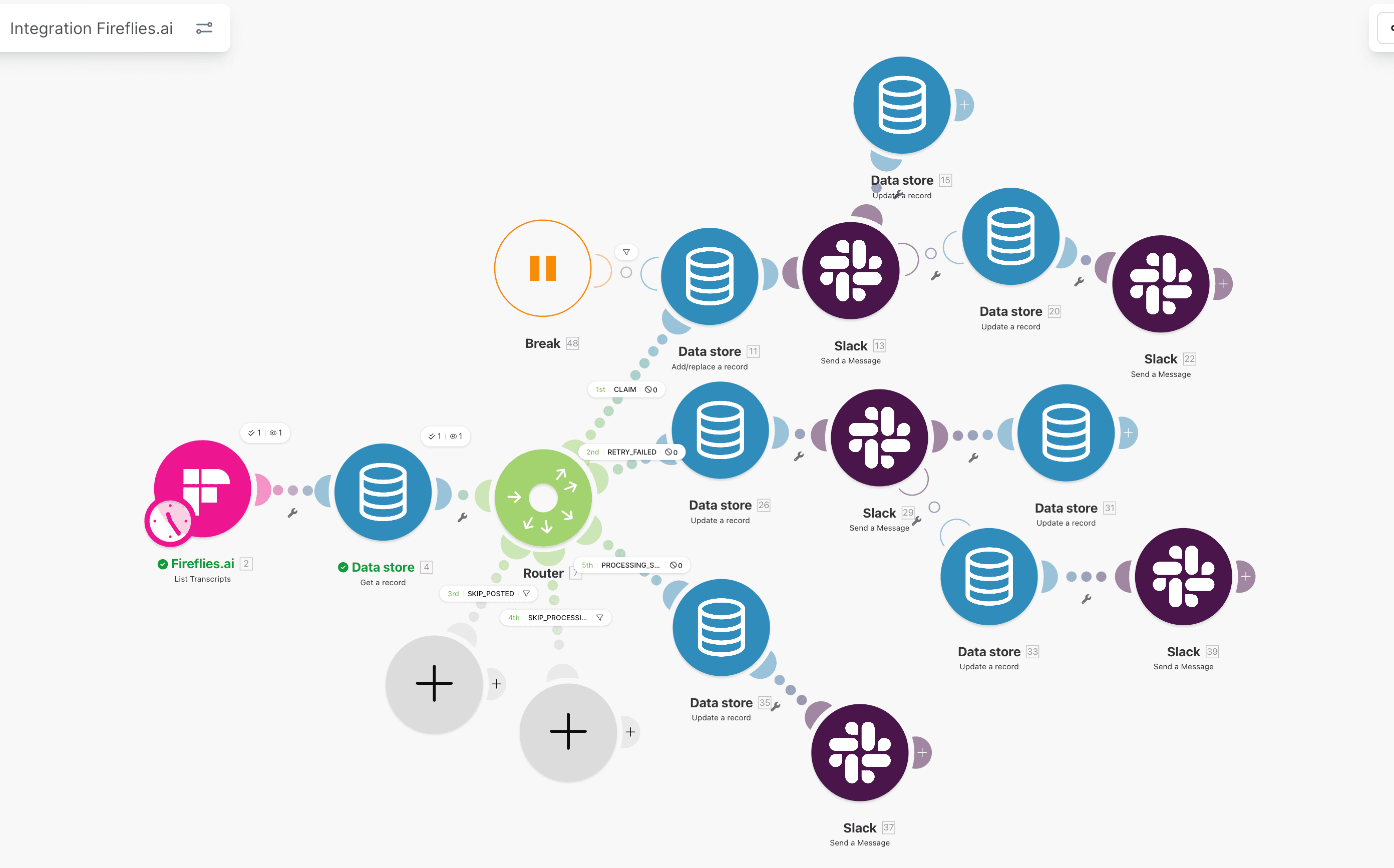
Validation gates prevent incomplete contacts from entering CRM state.
Step 5: Error handling and alerts with clear ownership
Every critical module that can break data integrity needs an error handler path.
Failure branch order:
- write
failedstate in Data Store, - include error class and message,
- send Slack alert with context,
- stop execution.
Alert payload must include:
- submission token (
processing_id), - source form id,
- HubSpot action that failed,
- short error class (
validation_error,api_timeout,rate_limit), - run URL,
- owner and SLA.
If alerts are generic, operators waste time reconstructing incident context from logs.
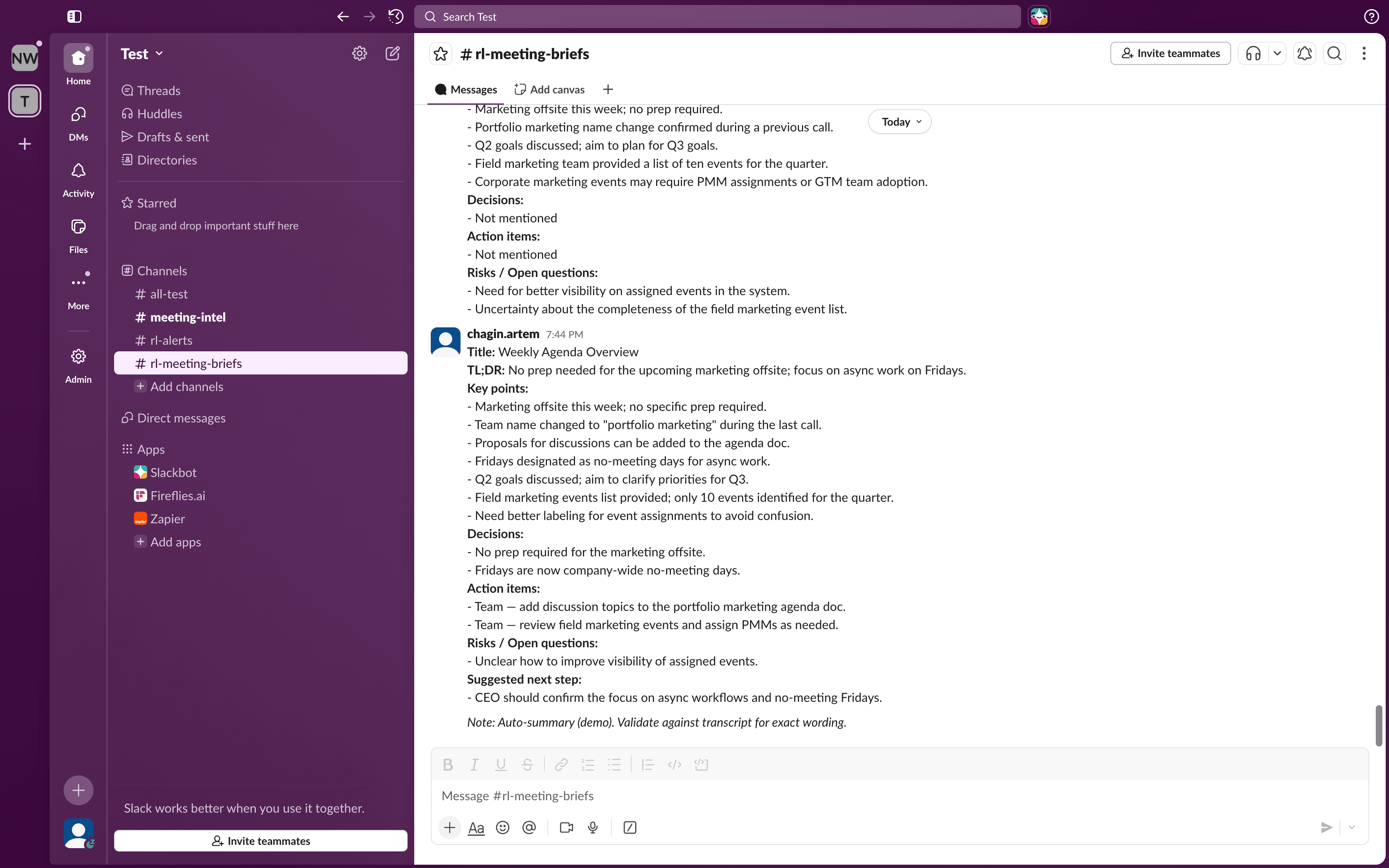
Write failed state first. Then alert. Then stop.
Step 6: Add a practical monitoring loop
A reliable setup still needs ongoing checks. Monitoring is how you catch drift before it becomes cleanup work.
Daily metrics:
- duplicate-created count,
- duplicate-prevented count,
- failed-state backlog size,
- oldest failed item age,
- owner response time,
- replay success rate.
Weekly checks:
- inspect 20 recent submissions end-to-end,
- sample 5 skipped duplicates and verify correctness,
- review alert noise and adjust thresholds,
- archive completed state rows older than retention target.
For monitoring mechanics, pair this guide with Make.com monitoring in production.
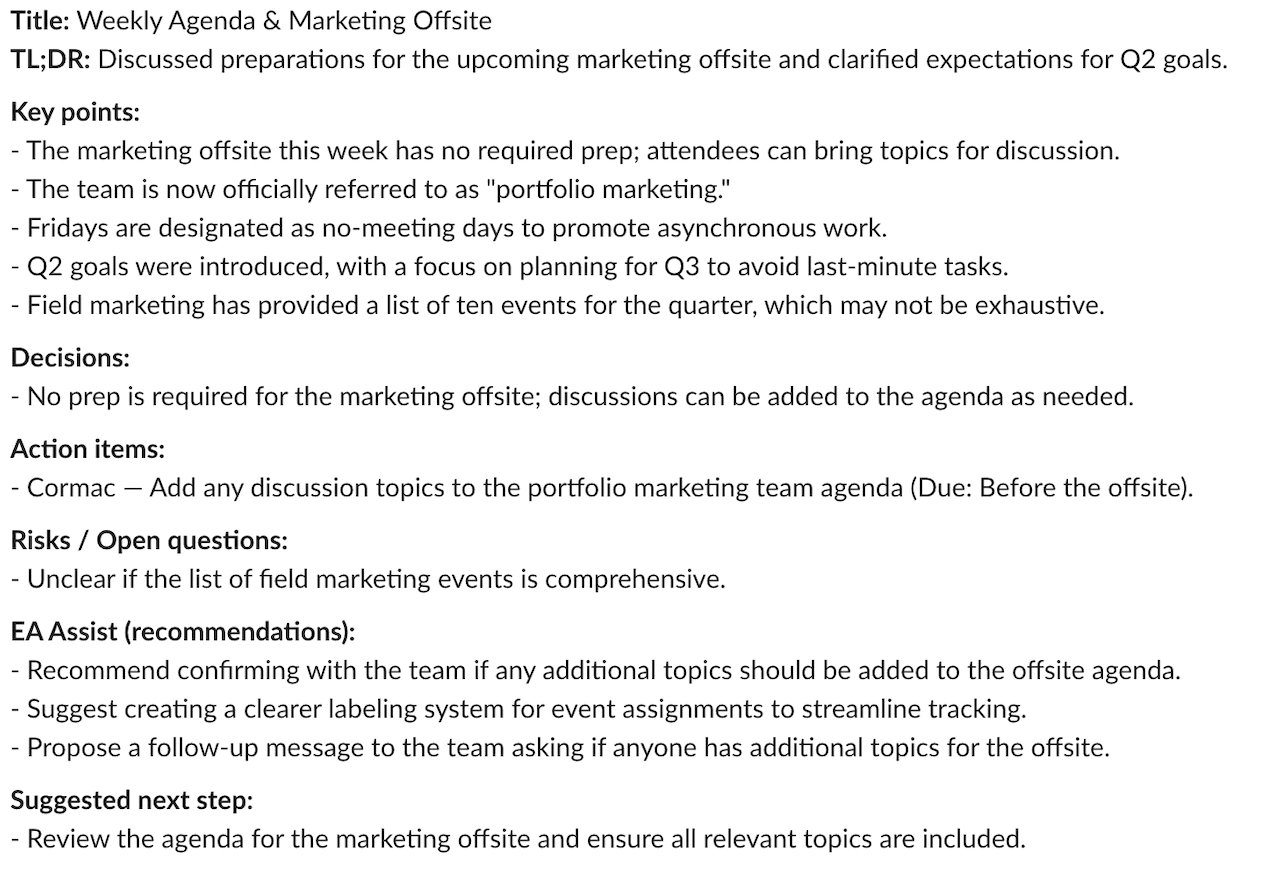
High-signal alerts reduce mean time to resolution and prevent silent backlog growth.
Step 7: Test failure scenarios before go-live
Teams often test only happy path and call the lane production ready. That is where avoidable incidents begin.
Run this minimum matrix:
| Test | Method | Expected result |
|---|---|---|
| Duplicate submission | Re-send same submission token. | Second run skipped, no second contact. |
| Missing email | Submit payload without email. | State failed, alert sent, no create. |
| HubSpot timeout | Simulate API timeout. | Failed state captured, replay available. |
| Webhook resend burst | Send same event multiple times quickly. | Lock branch prevents concurrent duplicate write. |
| Manual replay | Replay one failed record. | Single completion, no new duplicate. |
Testing outcomes should be documented in a short release checklist and signed off by workflow owner.
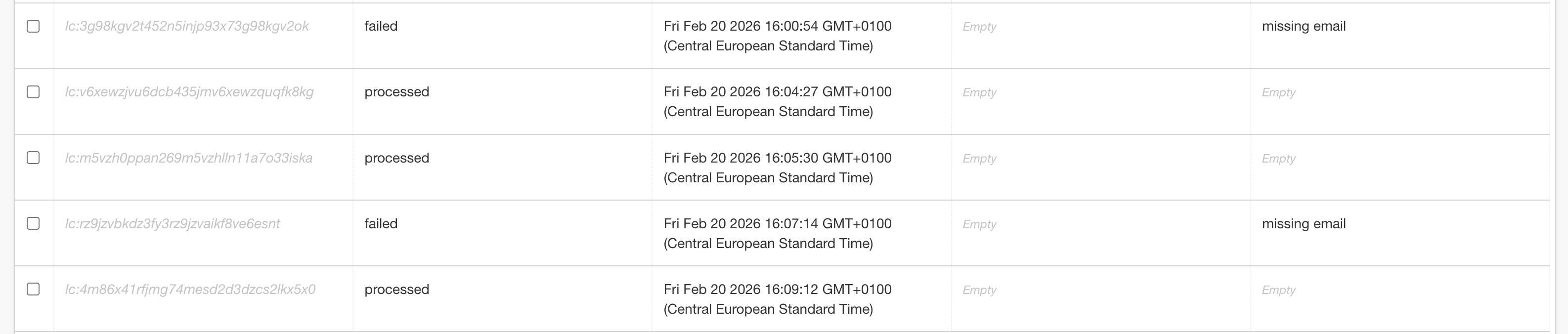
If this matrix is not passing, the lane is not production safe yet.
Before and after reliability profile
The improvement is measurable if controls are applied as one system.
| Metric | Before (default setup) | After (reliability setup) |
|---|---|---|
| Duplicate contacts | Recurring under retries. | Near zero with key-based gating. |
| Lost submissions | Unknown until manual discovery. | Explicitly tracked with failed state. |
| Error visibility | Low or delayed. | Alerted in near real time. |
| Cleanup load | Weekly manual merges. | Reduced to exception-only handling. |
| Auditability | Fragmented logs. | Submission-level state trail. |
This is consistent with outcomes in Typeform to HubSpot dedupe, where control design changed duplicate behavior from reactive cleanup to deterministic prevention.
Maintenance runbook (lightweight but strict)
Once live, keep a compact operating cadence:
Daily:
- review failed queue and owner assignments,
- verify no stale
processingrows beyond timeout window.
Weekly:
- trend duplicate-created and replay volume,
- validate 10 random completed rows for field accuracy,
- review mapping changes requested by business teams.
Monthly:
- retention cleanup for completed rows older than 90 days,
- schema review for new Typeform fields,
- permission review for who can modify write paths.
If cadence is skipped, reliability drifts gradually and is usually noticed only after reporting quality drops.
Common implementation mistakes and how to avoid them
Mistake 1: Using execution id as dedupe key
Execution id changes per retry, so dedupe never works. Use submission token or deterministic source-derived key.
Mistake 2: No lock handling for concurrent submissions
Two near-simultaneous events can both pass naive checks. Route processing state explicitly and enforce timeout rules.
Mistake 3: Mapping optional fields as hard overwrites
Empty optional form values can overwrite valid HubSpot data. Add overwrite guards for known properties.
Mistake 4: Alerting without ownership metadata
Alerts without owner and action path create long response times. Include owner, SLA, and next action directly in payload.
Mistake 5: No replay process for failed rows
Teams manually rerun entire scenarios and create side effects. Build a controlled replay lane for failed records only.
Decision boundary: when this full setup is required
Use the full reliability setup when:
- form volume is meaningful,
- CRM state drives sales routing and reporting,
- duplicate contacts have direct cost,
- compliance or audit traceability is required.
If this is a personal low-volume form with no downstream automation, a lighter setup may be enough. For B2B RevOps and Finance Ops workflows, the full model pays for itself quickly in avoided cleanup and stable data quality.
FAQ
Can I use native Typeform to HubSpot integration and still be reliable?
For low-risk workflows, native can be acceptable. For production lanes where duplicates, retries, and auditability matter, native-only setups usually lack the controls needed for deterministic behavior. Add state tracking and ownership if the lane affects revenue or finance decisions.
What should I use as processing_id in this integration?
Use Typeform submission token or another stable source event key. Do not use Make execution identifiers because they change during retries. A stable key is required for dedupe, replay safety, and traceability across systems.
How quickly should errors be visible to operators?
For contact ingestion lanes tied to sales routing, error visibility should be close to immediate. A practical target is alerting within one minute and first owner response inside 15 minutes for high-priority workflows.
How do I stop old successful records from slowing Data Store searches?
Apply retention rules. Keep failed and dead-letter records longer for diagnostics, and archive completed records after 60 to 90 days based on audit requirements. This keeps lookup performance stable and reduces noise during incident triage.
Next steps
- Get the free 12-point reliability checklist
- Review Make.com Data Store as a state machine
- Review Make.com retry logic without duplicates
- Review HubSpot workflow audit: 7 silent failures
- See HubSpot workflow automation service
- If you want a direct implementation plan, use Contact
Cluster path
HubSpot Workflow Reliability
Duplicate prevention, lifecycle integrity, and workflow ownership for revenue teams running HubSpot in production.
Related guides
Continue with these articles to close adjacent reliability gaps in the same stack.
March 8, 2026
Typeform, HubSpot, Slack: Where Duplicate Writes Start
typeform hubspot slack duplicate writes usually start upstream in Make.com branch order. This guide maps retries, event keys, and alert side effects.
March 9, 2026
HubSpot Contact Creation Webhooks: Stop Duplicate Contacts
HubSpot contact creation webhooks can fire multiple create and property-change events in Make.com. Learn burst control, dedupe keys, and safe contact writes.
March 8, 2026
Why HubSpot API Creates Duplicate Companies in Production
why hubspot api creates duplicate companies: HubSpot does not deduplicate API-created companies by domain. This guide shows safe upsert and retry controls.
Free checklist: Stripe Connect Ops Checklist
Get the PDF after submission. Use it to run through payout, verification, and triage checks when connected account behavior breaks in production.
Free 30-minute discovery call available after review. Paid reliability audit from €500 if fit is confirmed.
Need reliability work in production?
Book a scoping call. I map the highest-risk lane and confirm fit before a paid audit. Start with a free 30-minute audit-scoping call. Paid reliability audit starts from €500 if fit is confirmed.